
Best Offer Automation
Set your rules once and let CardLuma handle the rest. Define price thresholds and minimum offer percentages — every listing gets the right Best Offer settings automatically. No more manually toggling offers on each card.
Configure Once, Apply Everywhere
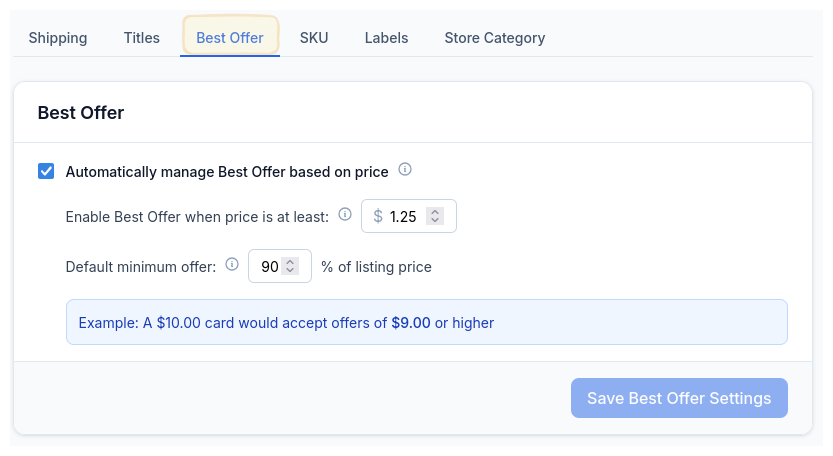
Set a price threshold for when Best Offer should be enabled, and define your minimum acceptable offer as a percentage of the listing price. CardLuma does the math on every card automatically.
A $10.00 card with a 90% minimum? Offers of $9.00 or higher get accepted. A $1.25 card that doesn’t need offers at all? It stays off. You set the rules, CardLuma enforces them across your entire inventory.
Every Card, Already Dialed In
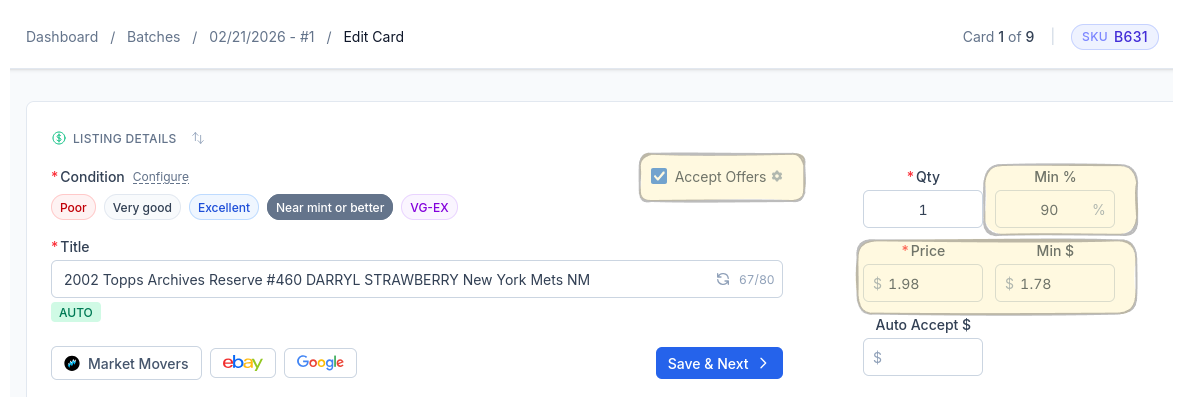
When you open the card edit screen, Best Offer is already configured. The Accept Offers checkbox, minimum percentage, calculated minimum dollar amount — all pre-filled from your rules.
Review it, tweak it if you want, or just hit Save & Next. The point is you never start from scratch. Your rules did the work before you got there.
Rule-Based
Set price thresholds and minimum percentages. CardLuma applies them to every listing automatically.
Auto-Calculated
Minimum dollar amounts computed from your rules. No mental math, no spreadsheets.
Zero Manual Entry
Best Offer fields pre-filled on every card. Review and move on — or just move on.
Ready to List Smarter?
Start scanning and listing cards in minutes. No credit card required.
Sign Up for Your Free Trial