
Custom Card Conditions
eBay gives you four condition options. Anyone who’s graded cards for more than a week knows that’s not enough. A card that’s better than “Very Good” but not quite “Excellent” just gets shoved into whichever bucket you feel like that day. That’s inconsistent, and inconsistency leads to returns.
Your Grades, Mapped to eBay
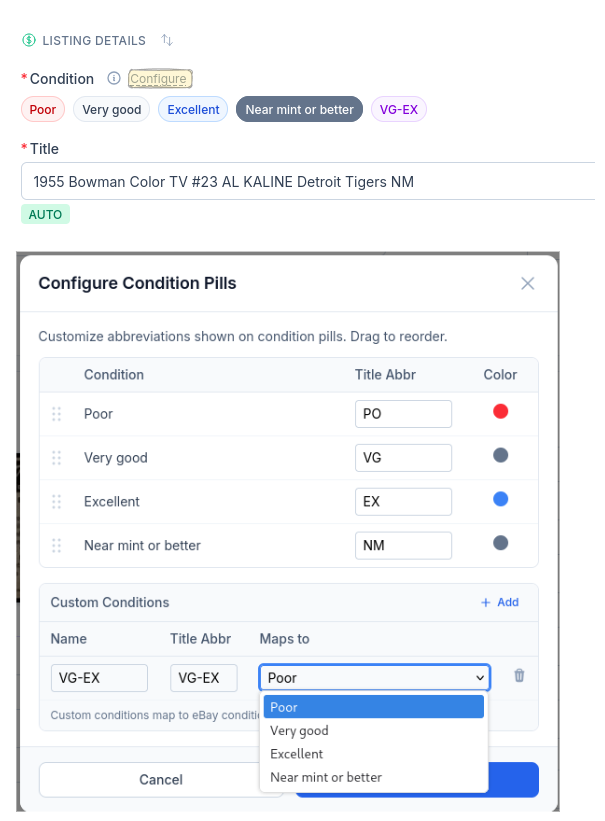
Create conditions that match how you actually grade — VG-EX, EX-MT, whatever your system is. Each one maps to an eBay condition under the hood so the listing stays compliant, but your internal grading stays as precise as you need it.
The abbreviation goes straight into your title automatically, so buyers see exactly what they’re getting and you spend less time dealing with “not as described” cases.
Your Grading System
Create as many custom conditions as you need. VG-EX, EX-MT, NM-MT — grade the way you actually grade.
eBay Mapped
Every custom condition maps to one of eBay’s four grades. Your listings stay compliant automatically.
Title Auto-Fill
Condition abbreviations go straight into your listing title. Buyers know exactly what they’re getting.
Ready to List Smarter?
Start scanning and listing cards in minutes. No credit card required.
Sign Up for Your Free Trial