
Scheduled Listings
List 200 cards at once and eBay’s algorithm treats it like a dump. Stagger them out over a day or a week and each one gets its own window of visibility in search results.
Stop Publishing Like a Firehose
You already know this — the problem is you’re not going to sit there and manually publish one card every 10 minutes for three hours straight.
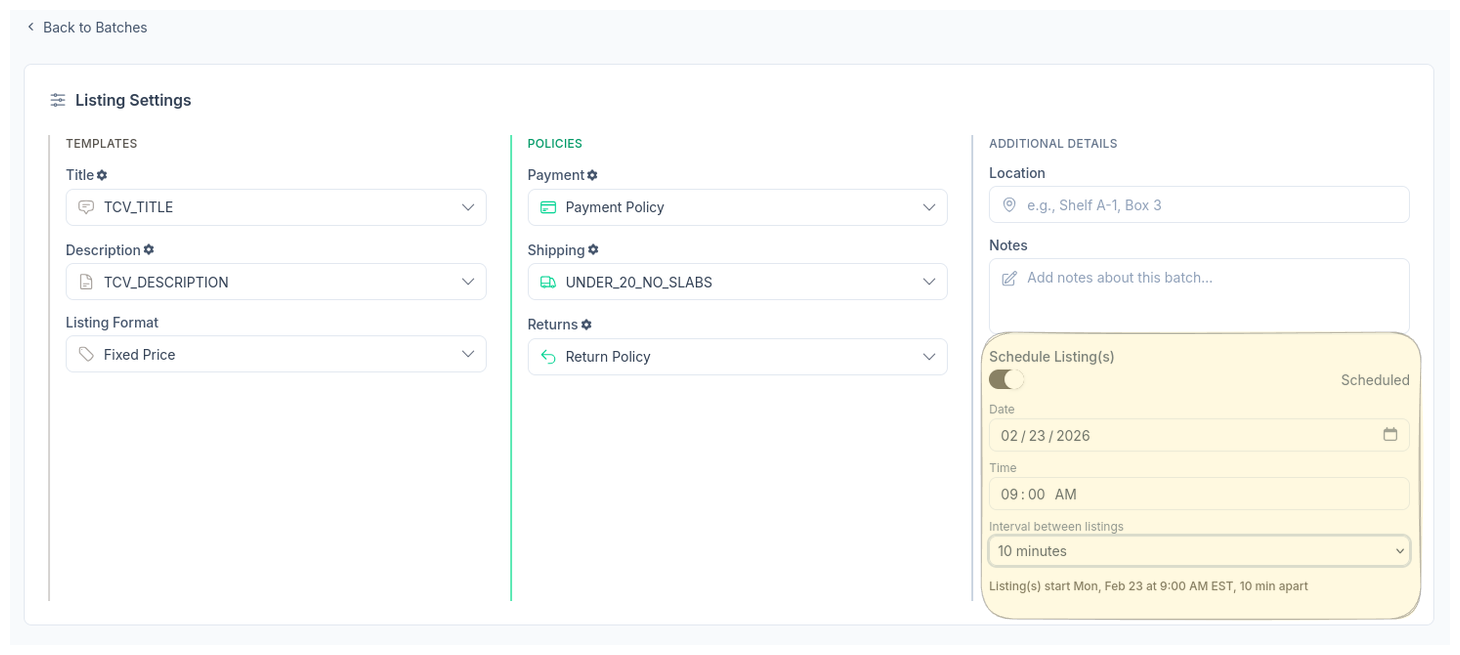
Set a date, a time, and an interval. CardLuma publishes them on that schedule while you do literally anything else. Sunday night batch prep, Monday morning listings start rolling out every 10 minutes. Your store gets a steady drip of new inventory hitting search results.
Pick Your Schedule
Set the start date, start time, and interval between listings. 10 minutes, 30 minutes, an hour — whatever works for your store.
Batch-Level Control
Schedule an entire batch at once from the batch settings screen. Every card in the batch publishes on your timeline automatically.
Steady Search Visibility
Each listing gets its own moment in eBay search results instead of competing with 200 of your own cards posted at the same time.
Ready to List Smarter?
Start scanning and listing cards in minutes. No credit card required.
Sign Up for Your Free Trial