
Listing Workflow
Auto-Filled Item Specifics for Sports Cards: Why Accuracy, Consistency, and Speed All Matter
Every eBay sports card listing has 20 to 30 item specific fields. Filling them out by hand is slow, inconsistent, and riddled with mistakes. That is not a minor problem. It is a structural drag on your entire operation.
The Item Specifics Problem Nobody Talks About
Most sports card sellers know they should fill out item specifics. The previous generation of advice was simple: fill out the fields. And that advice was correct. eBay uses item specifics to surface listings in search, power category filters, and match buyer queries to inventory.[1]
But there is a second-order problem that almost nobody discusses: how those fields get filled out.
When you are listing five cards, it does not matter much. You can type each field by hand, double-check the set name, get the card number right, and move on. But when you are listing 50 cards a day, or 200, or 500, the manual approach breaks down in three predictable ways.
- Accuracy drops. You start mistyping player names, mixing up parallel names, entering wrong card numbers. Not because you are careless, but because repetitive data entry at volume creates mistakes. That is just how humans work.
- Consistency disappears. One listing says "Panini Prizm." The next says "Prizm." Another says "2024 Prizm Basketball." eBay treats these as different values. Your inventory becomes a mess of near-duplicates that do not aggregate properly in search.
- Speed tanks. Filling out 25 fields per card, manually, across hundreds of listings, is brutally slow. It is the single biggest bottleneck in most listing workflows.
These three problems compound. And they cost you real money.
Accuracy Is Not Optional
Here is the blunt truth: a wrong item specific is worse than a missing one.
If you leave a field blank, the listing just misses that filter. Buyers searching by that attribute will not find it, but at least nobody is misled. If you enter the wrong data — wrong year, wrong set, wrong parallel — you create a different problem entirely.
Wrong item specifics erode buyer trust. A buyer searching for a 2023 Topps Chrome refractor who finds your card listed as a 2024 Topps Chrome base is going to lose confidence in your store. Even if the title and photos are correct, conflicting structured data raises questions. And questions reduce conversion.
eBay's own trading card guidance is explicit about this. They tell sellers to include accurate card details including the grader, numerical grade, and certification number for graded cards, and to select the correct condition for raw cards.[2] Accuracy is not a suggestion. It is part of how eBay expects the category to work.
Where manual errors hit hardest
- Parallel names: "Silver Prizm" vs "Silver" vs "Prizm Silver" vs "Silver Ice Prizm" — eBay treats each as a distinct value. Get it wrong and your card disappears from the filter the buyer is actually using.
- Card numbers: Transposing digits is easy when you are typing hundreds of numbers. Card #127 listed as #172 will never match a buyer searching for the specific card.
- Player names: "Luka Doncic" vs "Luka Dončić" vs "Doncic, Luka" — inconsistency fragments your visibility across search.
The sports card category has an unusually high number of precise, filterable attributes. Year, set, manufacturer, team, sport, player, card number, parallel, autograph status, relic status, grading company, grade, certification number, rookie designation, league, and more. That is a lot of fields where a small mistake creates a real problem.
Consistency Compounds Over Time
Accuracy is about getting each listing right. Consistency is about getting every listing right the same way.
This distinction matters more than most sellers realize.
eBay's search and filter system works on exact-match structured data.[1] When a buyer clicks "Prizm" in the left-hand filter, eBay returns listings where the set field exactly matches "Prizm." If your listing says "Panini Prizm" instead, it will not appear in that filter result. Both values might be accurate descriptions of the product. But only one matches what the buyer clicked.
Now multiply that across every field and every listing in your store. If your team — or just you on a tired Tuesday night — enters set names, parallel names, and player names slightly differently from listing to listing, your inventory fragments. Some listings match the filters. Some do not. You lose visibility on cards that are otherwise perfectly listed.
This is a silent problem. You never see the searches your listings were excluded from. You just see slower sales and wonder why.
The consistency test
Go to your eBay store. Filter your active listings by a specific set — say, "Topps Chrome." Now search your own listings for "Topps Chrome" as a buyer would. If the counts do not match, you have a consistency problem. Some of your listings are using a different value for the same set, and those cards are invisible in that filter.
Speed Is the Multiplier
Even if you are perfectly accurate and perfectly consistent, doing it by hand is slow.
A typical eBay sports card listing has somewhere between 20 and 30 item specific fields depending on the subcategory and card type. For a raw card, you are looking at sport, player, team, set, year, manufacturer, card number, parallel, league, condition, features, and several more. For a graded card, add the grading company, grade, and certification number on top of that.
If each field takes 3 to 5 seconds to fill out manually — navigating dropdowns, typing values, correcting autocomplete suggestions — that is roughly 60 to 150 seconds per listing just on item specifics. Call it two minutes on average.
The math on manual item specifics
At two minutes per listing, 100 listings a day means 200 minutes — over three hours — spent on item specifics alone. That is three hours of repetitive typing that adds no creative value, no strategic value, and no judgment. It is pure data entry.
At 200 listings a day, you are looking at six and a half hours. That is not a workflow. That is a full shift of copy-paste.
Time spent on manual data entry is time not spent on sourcing, pricing, photography, customer service, or any of the activities that actually grow a card business. The sellers who list at volume are not typing faster. They are typing less.
What Auto-Filled Item Specifics Actually Solve
Auto-filling item specifics means the system identifies the card and populates the structured fields for you. You verify and adjust. You do not start from a blank form.
This solves all three problems at once:
- Accuracy improves because the values come from a card database, not from memory or squinting at fine print on the card. The parallel name is the canonical parallel name. The card number is the correct card number. The set name matches what eBay expects.
- Consistency locks in because every listing for the same set uses the same set name, every listing for the same player uses the same player name, and every parallel uses the same parallel designation. No drift. No fragmentation.
- Speed jumps because instead of filling 25 fields, you are reviewing 25 pre-filled fields. Review is faster than entry. Dramatically faster.
The shift from "fill out" to "verify" is the operational unlock. You still control the data. You still catch edge cases. But you are not starting from zero every time.
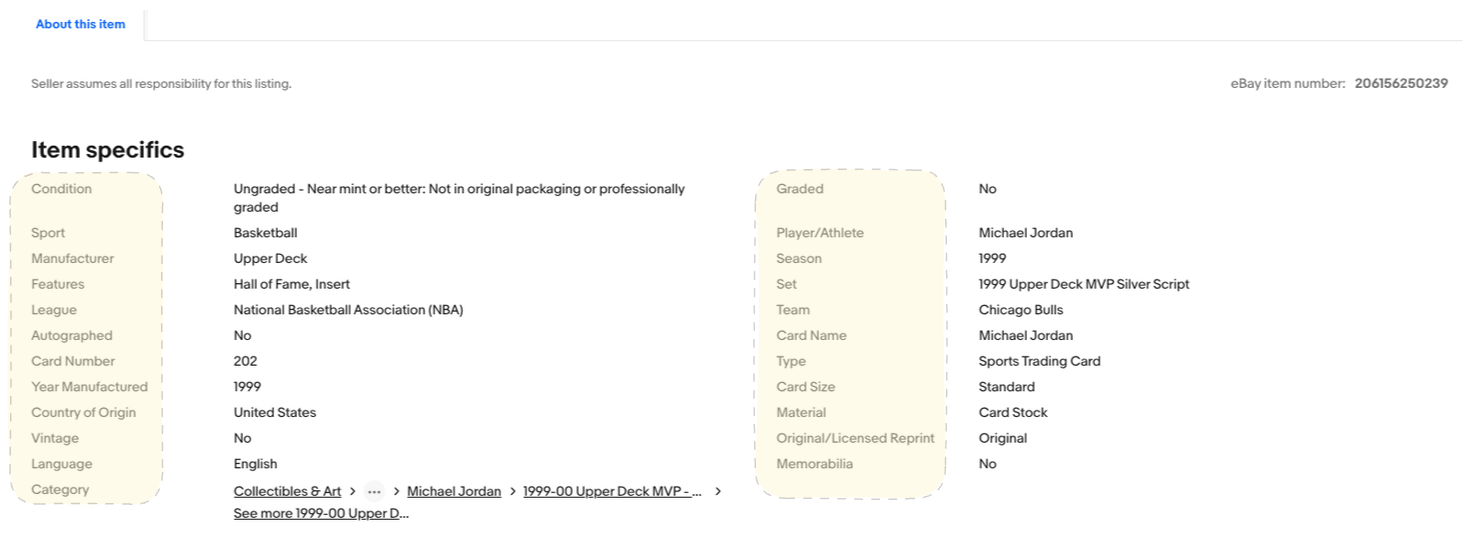
The Fields That Matter Most for Sports Cards
Not all item specifics carry equal weight. Some fields drive the majority of buyer filtering and search matching. For sports cards on eBay, the high-impact fields are:
- Player/Athlete: The single most searched attribute. Buyers search by player name more than anything else. Getting this wrong or inconsistent is the most expensive mistake.
- Set: Buyers filter by set constantly, especially during release season. "Topps Chrome" and "Chrome" are not the same filter value.
- Year Manufactured: Buyers narrow by year to find the specific product run. Wrong year means your card shows up in the wrong results.
- Card Number: Serious collectors search by card number to find the exact card they need for a set build. This has to be right.
- Parallel/Variety: This is where the money is. A Silver Prizm and a base Prizm are very different products at very different price points. The parallel field has to be precise.
- Team: Team collectors are a huge buyer segment. Missing or wrong team data means missing an entire audience.
- Condition / Grade: eBay requires condition. For graded cards, the grader and numerical grade are essential for buyer confidence and search matching.[2]
Every one of these fields is a path a buyer can take to find your card. Every one you get wrong or skip is a path that leads nowhere.
Manual Listing Does Not Scale
There is a ceiling on how many cards you can list per day by hand and still maintain quality. Every seller hits it at a different point, but everyone hits it.
Below that ceiling, manual listing works fine. You can be careful, thorough, and consistent when you are listing 20 cards. Above that ceiling, something gives. Usually accuracy goes first. Then consistency. Then you start skipping fields entirely just to keep up with volume.
That is the trap. The sellers who need the most complete listings — high-volume dealers with large, diverse inventory — are the ones least able to achieve them manually. The workload makes quality impossible at the exact point where quality matters most.
eBay itself acknowledges this tension. Their item specifics documentation notes that providing complete structured data improves search visibility on both eBay and external search engines.[1] Their listing optimization guidance says detailed item specifics help buyers quickly identify key product features.[3] The platform rewards completeness. But completeness at scale requires automation.
Better Inputs, Better Listings, Better Results
This is not complicated.
Accurate item specifics mean your listings show up in the right searches and the right filters. Consistent item specifics mean your entire inventory works together instead of fragmenting across slightly different values. Fast item specifics mean you can list more cards without sacrificing quality.
The sellers who scale profitably are the ones who figured out how to maintain listing quality while increasing volume. That almost always means automating the repetitive, structured parts of the listing process — starting with item specifics.
Sloppy data entry is not a character flaw. It is a systems problem. And systems problems get solved with better systems.
References
- eBay Seller Center, "Item specifics requirements," stating that item specifics increase visibility on eBay and external search engines and help match listings through query search, filters, and category pages.
- eBay Seller Center, "Selling trading cards," guidance for card listings including graded card fields such as grader, numerical grade, and certification number, and condition guidance for ungraded cards.
- eBay Seller Center, "How to optimize your listings," stating that detailed item specifics improve search visibility and help buyers quickly identify key product features.
List faster. List cleaner. List more.
CardLuma auto-populates 30+ eBay item specifics per card from a single scan — player, set, year, parallel, team, card number, and more. Accurate, consistent, and fast. Every time.
Start Your Free TrialNo credit card required. 14-day free trial.