
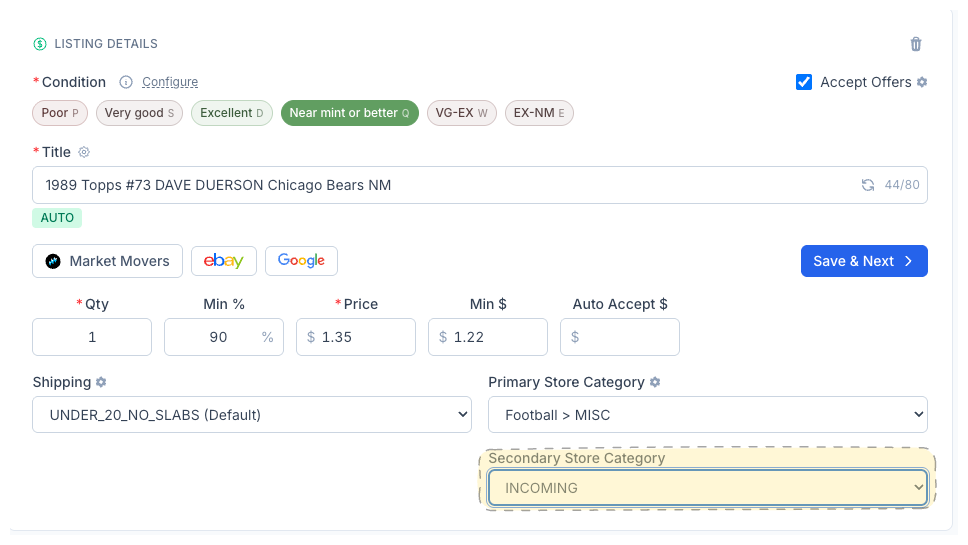
Secondary Store Category
Every eBay listing can live in two store categories. CardLuma now lets you assign both — so a Dave Duerson card shows up under “Football > MISC” and “INCOMING” at the same time. More browse paths, more visibility, same workflow.
Two Categories, One Dropdown
The Secondary Store Category dropdown sits right below the Primary on the card edit screen. Pick it manually, or let your Store Category Automation rules handle it. Either way, both categories publish to eBay when the listing goes live.
Buyers browse eBay stores by category. A card filed under only one category is invisible to anyone browsing the other. Secondary categories fix that — your card appears in both paths without duplicating the listing.
Click image to view full size
Double the Browse Paths
Your card appears in two store categories. Buyers browsing either path will find it — no duplicate listings needed.
Automation Compatible
Works with Store Category Automation rules. Set primary and secondary routing in one rule set and let CardLuma handle it.
Zero Extra Steps
One dropdown, right next to the primary. Pick a category or leave it blank — it’s optional and adds no friction to your flow.
Ready to List Smarter?
Start scanning and listing cards in minutes. No credit card required.
Sign Up for Your Free Trial