Store Category Sync
If a buyer lands on your store looking for 1952 Topps, they should be able to find 1952 Topps. That’s it. That’s the whole argument for store categories.
Your eBay Categories, Already Here
Most sellers never set up store categories because it’s tedious, so their store is just one giant unsorted pile. Buyers bounce.
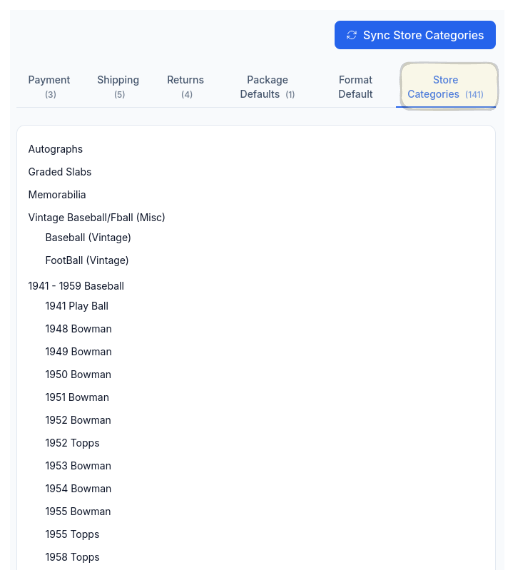
CardLuma syncs your existing eBay store categories so you can actually route cards where they belong. A buyer who collects vintage Bowman shouldn’t have to scroll past 300 modern cards to find it. Organized stores get more eyes on more listings — not because of some algorithm trick, just because people can find what they came for.
Auto-Routed on Every Card
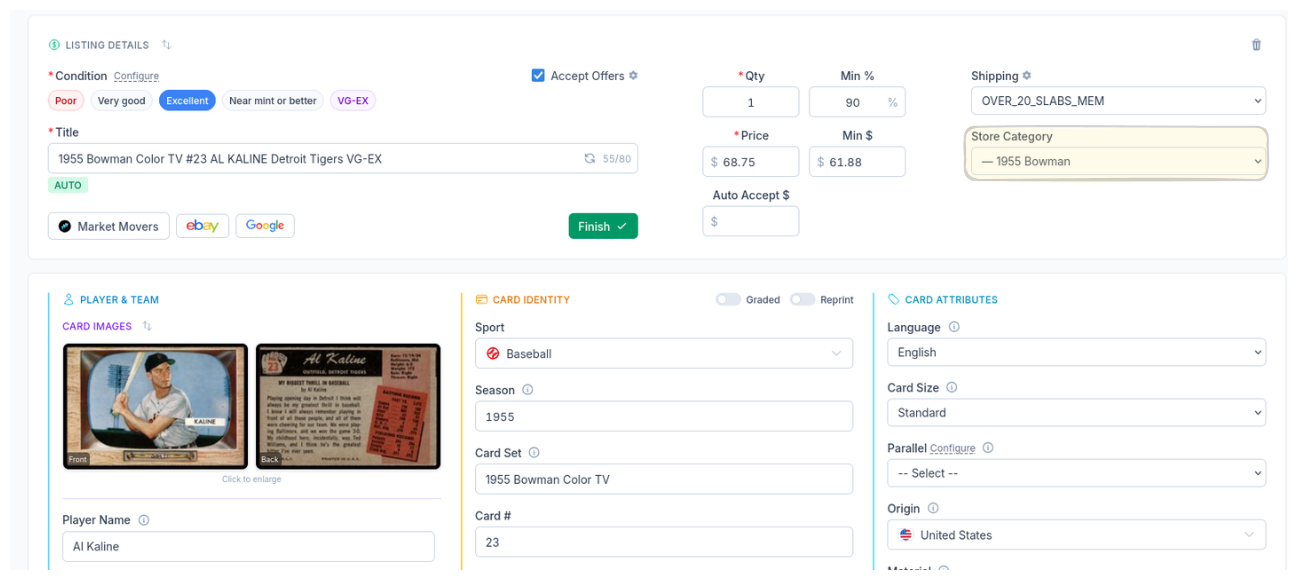
When you edit a card, the store category is already assigned. A 1955 Bowman card goes to the 1955 Bowman category. No dropdown hunting, no forgetting, no cards landing in the wrong bucket.
Pair this with CardLuma’s Store Category Automation rules and every listing routes itself. You set the logic once, and every card after that just goes where it belongs.
One-Click Sync
Pull your full eBay store category tree into CardLuma. All levels, all subcategories, instantly available.
Auto-Assigned
Cards get routed to the right category automatically based on your rules. No manual selection.
Buyers Find More
Organized stores keep buyers browsing. More browsing means more listings seen and more sales.
Ready to List Smarter?
Start scanning and listing cards in minutes. No credit card required.
Sign Up for Your Free Trial