
Scanner Guide
RICOH fi-8170 vs. fi-800R vs. ScanSnap SV600: Which Scanner Is Right for Your Card Operation?
If you're scanning cards to list at scale, your scanner choice is a real business decision — not a gear preference. Here's the straight breakdown of the three most commonly discussed Ricoh options in the card-dealing community.
At a Glance
| RICOH fi-8170 | RICOH fi-800R | ScanSnap SV600 | |
|---|---|---|---|
| Type | High-speed ADF | Compact dual-path ADF | Overhead contactless |
| Speed | 70 ppm / 140 ipm | 40 ppm / 80 ipm | ~3 sec/scan (contact-free) |
| ADF Capacity | 100 sheets | 20 sheets | N/A — no ADF |
| Optical Resolution | 600 dpi | 600 dpi | 285 x 283 dpi |
| Network (Ethernet) | Yes (Gigabit + USB 3.2) | No (USB only) | No (USB 2.0) |
| TWAIN/ISIS Driver | Yes | Yes | No |
| Card Handling | Raw, sleeved; manual feed up to 7 mm | Raw, sleeved; front slot up to 5 mm | Slabs, top loaders, foil, raw |
| Daily Volume | 10,000 sheets | 4,500 sheets | Not rated (overhead use) |
| Approx. Price | ~$950 | ~$510 | ~$640 |
RICOH fi-8170: The Volume King
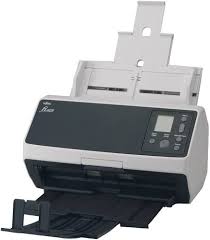
The fi-8170 is the scanner that professional card dealers running serious volume end up on. It's a workgroup-class ADF built for 10,000 sheets per day, scans at 70 pages per minute (140 images per minute duplex), and has a 100-sheet ADF that you can reload while it's still running. Its full TWAIN/ISIS driver support means it integrates with listing platforms like CardLuma.
What makes it the right call for dealers
The fi-8170 ships with full TWAIN and ISIS driver support plus PaperStream IP, Ricoh's image processing engine. That means it integrates directly with third-party software — including CardLuma — without any workarounds. You configure a scanning profile once, and it runs.
Network connectivity (Gigabit Ethernet) means you can share the scanner across a workstation or connect it directly to a server without sitting next to a laptop. If you're running a fulfillment-type operation with dedicated scanning stations, this matters.
The Clear Image Capture (CIC) technology is Ricoh's optical processing layer that corrects color, reduces shadow, and captures fine text detail. Card numbers, parallel names, copyright text on the card back — all of it comes through cleanly at 300 dpi. Ricoh publishes downloadable PaperStream IP profiles for trading card and gaming card scanning, which give you a tuned starting point rather than building scan settings from scratch.
For chrome and Prizm cards, the fi-8170 handles them better than most ADF scanners, though you'll want to adjust your scanning profile (sRGB output, adjusted brightness) rather than using the default settings. Cards can be fed raw or sleeved; some top loaders may be manually fed depending on thickness (the fi-8170 supports manual-feed items up to 7 mm thick).
The downsides
Price. The fi-8170 runs roughly $950 new. If you're scanning 30 cards a night as a side operation, this scanner is overkill. It's also a proper workgroup device — it's not going to disappear in a small workspace.
Best for
Dealers processing 200+ cards per day, operations running batch AI identification, anyone who needs network connectivity.
RICOH fi-800R: The Space-Efficient Option
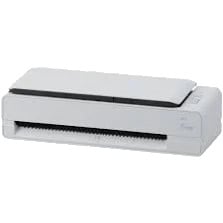
The fi-800R is a legitimate workhorse in a genuinely small package — 11.6 inches wide, U-turn ADF that returns documents back to where they started. The "dual path" design means it has two feed paths: the standard ADF on top for stacked documents, and a front manual slot that handles thick items (up to 5 mm) including IDs, passports, and thick plastic cards. Some top loaders and card savers may fit through that front slot depending on their thickness.
What makes it useful for card dealers
The 40 ppm / 80 ipm speed is solid for a mid-volume operation. It handles sleeved cards and raw cards cleanly, and the front return-path slot means you can feed thicker items in from the front without them bending around a curved paper path. The item goes in, gets scanned, and returns to you straight.
It carries full TWAIN/ISIS driver support, so it integrates with CardLuma and other third-party listing platforms the same way the fi-8170 does. PaperStream IP is included.
The 20-sheet ADF is the main throughput limiter. At 40 ppm, a full 20-card load takes about 30 seconds — but you're also reloading every 20 cards rather than every 100. For someone scanning a few hundred cards a night, that's a manageable rhythm. For someone scanning 500+ daily, it becomes a real drag.
USB-only connectivity is a minor point for most users, but if you're hoping to share the scanner across machines on a network, you'll need a USB sharing solution, which adds complexity.
The downsides
The consumable economics deserve attention. The brake pad (pad unit) on the fi-800R is rated for 30,000 sheets and runs about $15. At 750 scans per day, that's roughly one replacement every six weeks. It's not expensive, but it's a more frequent maintenance cycle than the fi-8170.
Best for
Mid-volume dealers (50–200 cards/day), tight workspaces, sellers who regularly handle thick items via the front slot.
Ricoh ScanSnap SV600: The Non-Contact Specialist
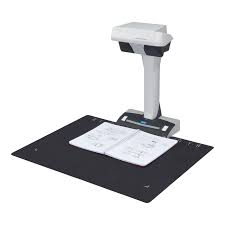
The SV600 is a fundamentally different device from the other two. It doesn't have an ADF. It doesn't feed cards through anything. It sits on your desk, you lay cards out on the included A3 scanning mat below it, and the overhead LED array scans everything on the mat in about 3 seconds. The ScanSnap software then auto-crops individual cards into separate images.
On a standard A3 mat, you can fit 8–10 trading cards at once and scan both sides with two passes. For a casual collector or a dealer handling small volumes of high-value cards, that's a genuinely pleasant workflow.
Where the SV600 shines for card work
Any card you would never put through an ADF is a candidate for the SV600. That means PSA/BGS slabs — which cannot go through any ADF at all — can be scanned in batches on the mat. It means foil/chrome/prizm parallels with high reflectivity get captured without the directional light source issues you get in feeder scanners. It means top loaders, card savers, thick holders — all fine. Nothing contacts the card. Nothing can jam.
The SV600 is also the only scanner here that can handle a slabbed card collection at any kind of speed. Lay out 8 slabs, scan, flip, scan. That's the workflow.
The critical limitation for listing operations
The SV600 uses ScanSnap Home software and does not include a TWAIN or ISIS driver.
Your workaround: scan with ScanSnap Home, export the individual card images to a folder, then upload that folder to CardLuma or your listing platform. It works, but it's an extra step in the workflow, and it breaks the seamless scan-to-identify-to-list pipeline that dedicated ADF scanners enable.
The optical resolution is also notably lower — 285 x 283 dpi maximum versus 600 dpi on the ADF scanners. That's adequate for eBay listings, but at the lower end. For cards where fine surface detail (print quality, surface wear) matters to buyers, the overhead image at max SV600 resolution will show less than a 600 dpi ADF scan.
The downsides
No TWAIN/ISIS means no direct software integration. Lower optical resolution than the ADF options. For raw/sleeved card volume, the scan-per-card rate is lower than either ADF scanner once you account for setup time per batch.
Best for
Slabbed card dealers, collectors with high-value foil/chrome cards they won't put through a feeder, anyone prioritizing zero card contact above everything else.
Foil, Chrome, and Prizm: A Special Note
All three scanners can handle foil cards, but the approach differs:
- fi-8170 — Adjust your PaperStream IP profile for reflective surfaces (sRGB output, adjusted brightness). Results are good when properly configured. The directional CIS light source will blow out reflective surfaces under default settings.
- fi-800R — Same approach. Same PaperStream IP profile adjustments. Results are comparable to the fi-8170, slightly lower throughput.
- SV600 — The overhead LED is genuinely better for reflective cards because the light source is diffuse rather than directional. You get less glare and more consistent surface capture. If foil/refractor cards are the majority of what you deal in, this matters.
Which One Should You Buy?
Buy the fi-8170 if:
You're running a real card-dealing operation. Volume is your bottleneck. You want network connectivity, the fastest throughput, the highest daily capacity, and direct platform integration without workarounds. The price premium pays back in time if you're scanning at any kind of scale.
Buy the fi-800R if:
Your volume is moderate, your workspace is limited, and you frequently handle thick items that benefit from the front return-path slot. It's a capable scanner at roughly half the fi-8170's price.
Buy the SV600 if:
You're primarily dealing in slabbed cards (PSA/BGS/SGC), your card values are high enough that zero-contact scanning is non-negotiable, or foil/refractor cards dominate your inventory. Understand going in that direct third-party software integration is off the table.
None of the above?
If you're still scanning with a flatbed all-in-one or a phone camera and wondering why your AI identification keeps misfiring — any of these three scanners will be a step change in accuracy and throughput. Start with the fi-800R and scale up when volume demands it.
List faster. List cleaner.
Use CardLuma to turn card scans into complete, priced, eBay-ready listings with reusable seller rules and no expiring scan credits.