
CardLuma News & Updates
Release notes, new features, and everything happening with the platform.
Version 2.8.19 Released
Answer your eBay buyers without leaving CardLuma: buyer messages, saved replies, and a first draft written for you, on every plan. Selling cards for other people? Consignor Tracking keeps what you owe each consignor in one place, with a statement you can send them, on Pro and up and in the trial. Underneath: repricing for Card Dealer Pro listings, selling-limit checks before a batch goes out, eBay.ca fixes, cleaner titles and descriptions, a District.net export, Lumi on the contact form, and a better feature request board.
eBay Messages
- Buyer Messages in CardLuma — Messages sits in the menu with a count of unread buyer messages. Read and answer buyer questions, including pre-sale questions, without switching to eBay. Offers get their own folder, and eBay’s own mail goes to From eBay, so it doesn’t bury your buyers. On every plan.
- Clear the Inbox in Bulk — Select messages and Mark read, Star, or Delete in one go. Deleted messages go to Trash, and Restore brings one back if you clicked too fast.
- Saved Replies and Draft Reply — Save the answers you type every week, like combined shipping or “still available”, under Settings → Account → Reply templates, then drop one into a reply. Draft reply writes a first answer for you to edit before you send it.
- New Message Alerts — Get an alert when a buyer writes. Turn alerts for buyer messages, offer messages, and messages from eBay on or off in Settings → Profile.
Consignors and Profit
- Consignor Tracking — Tag cards to a consignor and CardLuma tracks that consignor’s sales, fees, your commission, payouts, and what you still owe, with a CSV statement to hand them. No more matching a spreadsheet against eBay payouts at the end of the month. On Pro, Elite, Ultra, and Premier, and in the trial.
- Tag Consignors on Listings Without a Card — Consigned cards already live on eBay before you used CardLuma? Tag them from a picker on the eBay Listings grid. Sales after the tag count toward that consignor’s statement and your P&L, a retag only affects later sales, and a CardLuma relist keeps the tag.
- Card Cost Column — Switch on Card Cost in the eBay Listings column picker and see what you paid beside what it sold for. No CSV export needed to check a card’s margin.
Moving From Card Dealer Pro
- Reprice Listings Card Dealer Pro Created — The Price cell and Adjust Pricing now change prices on listings Card Dealer Pro and similar tools created. Before, CardLuma told you to relist them. Now you mark down old inventory from the same screen as your new cards, and the listing stays live with its watchers. Multi-variation listings are left alone rather than repriced one variation at a time.
- Bulk Relist Leaves Card Dealer Pro Listings Live — Relist no longer ends listings Card Dealer Pro and similar tools created. They stay live, and the summary tells you to relist them in the tool that created them. If CardLuma can’t confirm a relist with eBay, it leaves the listing alone, so you never lose a live listing to a relist that didn’t go through.
Listing and Relisting on eBay
- Selling Limit and Seller Setup Checked Before You List — If your eBay seller setup isn’t finished or this month’s selling limit is used up, List stops the batch before anything goes to eBay and tells you what to do next. Before, you found out from a wall of identical errors, one per card.
- Plain-English eBay Error 120 — Instead of eBay’s raw text, error 120 now tells you to finish your eBay seller setup, then click List Remaining. Hitting your selling limit partway through a batch gets a plain explanation too.
- Deleted Business Policies Caught Before Listing — If a shipping, return, or payment policy on your batch no longer exists on eBay, the batch is refused before listing with a message naming the policy, and the dropdowns mark it as gone. If CardLuma can’t reach eBay to check, the batch lists and eBay decides, so a hiccup doesn’t block a good batch.
- Smoother eBay.ca Setup and Listing — Canadian sellers can switch to eBay.ca right from setup step 2. Settings tells you how many live eBay.com listings stay on eBay.com after the switch. Envelope shipping sends eBay.ca’s own package code, a batch whose shipping policy ships from outside Canada is stopped before listing, and missing traffic stats now say why.
- Bulk Relist and Bulk End Finish Big Batches — Every listing you select gets processed. Large runs carry on in a follow-up pass instead of stopping at 30 minutes, so you no longer hunt for the ones left behind.
- Price Drops on Best Offer Listings Go Through — An Adjust Pricing decrease on a Best Offer listing now lowers the auto-accept and auto-decline amounts to fit and tries again, instead of eBay refusing it and leaving the old price. The nightly automatic price drop already worked this way.
- Cleaner eBay Listings Sync — Changing a SKU on eBay no longer adds a second row for the same listing. New listings picked up by the regular sync get their condition, category, and SKU, and a listing keeps its link to its card when eBay’s notice arrives while the batch is still publishing.
Cards, Titles, and Batches
- Identify the First Cards When Scans Run Short — When a batch has more cards than you have scans left, Identify offers to do the first ones instead of saying you’re out. The first-uploaded cards get identified and the rest wait in the batch. No more batch stuck because it’s a few cards bigger than your balance.
- Vintage Cutoff by Card Type — Set a separate vintage cutoff year for Sports, CCG, and NTC cards on the Titles tab. Each card uses its own type’s year.
- Cleaner Titles and Descriptions — Title Case keeps real player-name spelling: inner capitals, roman numerals, and accents. Rarity markers like <C> stay in descriptions, a Condition changed in the batch table updates its abbreviation, and CCG and NTC descriptions drop empty Player and Team rows. Settings refuses a template with an unknown placeholder, so a typo never reaches a listing. Pokémon and other non-sport batches get their automatic title template again on older accounts.
- Language Sent on CCG and TCG Listings — The card’s Language item specific now goes to eBay and into CSV exports.
- Fuller Parallel Dropdown — Sports cards show the set’s researched parallels even when a thinner list exists under another spelling of the set name.
- Automation Rules That Stay Put — Saving the Shipping, Best Offer, Description, or Store Category tab no longer undoes another tab you saved moments before. “Graded is not” store category rules now match ungraded CCG and NTC cards, and description rule priority goes up to 999.
- Photos Stay With the Right Card — Two cards can no longer end up sharing a thumbnail, and rotating or swapping a photo mid-processing no longer touches another card’s picture. Phone upload explains an oversized or refused photo and keeps uploading the rest, and photos with unreadable EXIF data upload normally.
- District.net Export — Turn it on in Settings → Profile and the batch Actions menu gets Export District.net, which downloads a District bulk-import CSV. If you also sell on District, you stop re-keying cards.
Help and Feature Requests
- Lumi Answers Before You Send — Write to support from the app and Lumi replies within a few seconds, from the help docs and your own account. If that fixes it, you’re done. If not, send your message on as usual.
- Support Replies Reach Your Inbox — When we reply to your in-app message, you get one email with a link to the conversation.
- A Better Feature Request Board — Similar requests appear while you type a title, so you can vote on one instead of posting a duplicate. A My requests tab and a “Yours” badge track what you posted, you get a message when someone comments on your request (one switch in Settings → Profile turns them off), and the Shipped tab lists shipped requests by version.
Version 2.8.5 Released
CardLuma now sells on eBay.ca. If you’re registered with eBay in Canada, you can list, sync, sell, and see your P&L in Canadian dollars. Underneath: a Possible duplicates filter on your listings, saves in card edit you can actually trust, a Parallel dropdown that only shows parallels from the card’s set, and Lumi pointing you to feature requests that match your question.
eBay Canada
- Sell on eBay.ca — Sellers registered in Canada can switch to eBay.ca, then list, sync, sell, and see P&L in Canadian dollars.
eBay Listings
- Possible Duplicates Filter — Shows copies side by side with an “N copies” badge. Bulk price, relist, end, and CSV export follow the filter, so you act on exactly the copies you’re looking at.
- Batch Location Column — Replaces Location and shows where the card’s batch is stored. Find the card when it sells.
- “Customized” Item Specific — Now sent on new listings, set to No when you leave it blank.
- Cleaner Non-Sport Titles — The year no longer prints twice.
Card Edit and Batches
- Saves You Can See — No more stuck “Saving…”. Rejected edits stay unsaved, and you’re warned before Prev or Save & Next. A bad or failed title stays unsaved until a valid one saves.
- Smarter Parallel Dropdown — Lists only the parallels for the card’s set when the set matches, and every parallel when it doesn’t. Identification reuses your existing parallel when the spelling differs only in punctuation or spacing.
- Base Copy Button — Turns a parallel back into its base card in one click.
- Editable Google Search — Set your own template in Settings → Templates → Search → Google. The default no longer adds “sports card” to non-sport and trading card game searches.
- Edit SKUs Inline — Edit SKUs right in the batch table, and reuse an SKU from bulk edit.
Help, Lumi, and Feature Requests
- Lumi Links Matching Feature Requests — When your question matches a request under consideration, Lumi links to it and asks for your vote, in the app and in Discord.
- Ask Lumi Page — Shows Lumi, with each answer in a speech bubble.
- Feature Request Board — Search across every status, and sort by Most votes or Newest. CardLuma remembers your sort.
Version 2.7.14 Released
No headline feature this time. Since 2.7.0 we’ve shipped thirteen small releases, and most of them go after the thing you feel every time you sit down with a stack of cards: waiting on the screen. Opening a card, saving a field, and identifying a card are up to 5x faster, and most of the bulk actions got quicker too. And if you’re on Pro or above, your plan now comes with more scans.
More Scans on Every Plan From Pro Up
- Higher Monthly Scan Limits — Pro now includes 3,500 scans a month, Elite 7,500, Ultra 15,000, and Premier 25,000. If a big box break used to push you into an add-on pack before the month was out, that happens less now. Already subscribed? We topped up your current cycle pro rata. There’s nothing to switch on.
Faster Where You Spend Your Day
- Card Edit Up to 5x Faster — Opening a card, saving a field, and identifying a card are all up to five times faster. The card edit dropdowns load quicker too. Over a 300-card batch, that adds up to real time.
- Quicker Uploads, Even From an iPhone — Uploads, thumbnails, and the market data panel all load faster. HEIC photos from an iPhone convert after the upload finishes instead of during it, so a batch of phone shots goes up quicker.
- Bulk Actions That Don’t Make You Wait — CSV export, archive, trash, restore, merge duplicates, List on eBay, bulk add photos, and bulk edit are all faster. So are the All Cards page and eBay inventory sync.
Card Edit, Batches, and Inventory
- See Which Item Specifics Are Too Long — eBay caps each item specific at 65 characters, and a long parallel or insert name can easily go over. Card edit now names every one that’s over the limit, shows its length, and checks again after each save. You fix it in CardLuma instead of finding out from an eBay error.
- Copy a Pricing Value Into Price — In a batch, one click copies a Pricing value (recommended, median, last sale) into that row’s Price cell. No more retyping a number that’s already on the screen.
- Save and Cancel on Inventory Edits — Editing price or quantity on the Inventory page now gives you Save and Cancel buttons, so a stray click doesn’t change a live listing’s price.
eBay
- Date Shipped Column — The eBay Listings grid has a Date Shipped column. See what went out and when, right next to the listing.
- Last Synced Means Last Synced — The Last synced time now shows when your account actually synced with eBay.
- A Clear Answer for eBay Error 21916250 — eBay’s own message for this one doesn’t tell you what to do. What actually works is waiting a bit and trying again, so that’s what CardLuma tells you now.
Help and Documentation
- Lumi Takes You to the Exact Setting — When Lumi walks you through a fix, each step’s button opens the exact Settings tab and section it’s talking about.
- A Documentation Page for Every Settings Tab — Each tab under Settings → Automation and Templates has its own Documentation page, so the help you need isn’t buried in one long page.
- Link to the Exact Section — Every Documentation heading has a copy-link icon, and cross-references go straight to the section they mean. When you’re helping another seller in Discord, send them the paragraph, not the whole page. CardLuma News stories in the app also link to that release’s section on this page.
- Faster Google Sign-In — Signing in with Google takes less time.
Version 2.7.0 Released
Three things carry this release. You can add cards to a variation listing that’s already live on eBay, raw cards now price off raw sales only, and Lumi answers questions from the help guide — on the Documentation pages and inside Discord. Underneath: presale handling times, Favorites, editable Card Ladder and Market Movers searches, and a run of smaller fixes dealers asked for.
Multi-Variation Listings
- Add Cards to a Live Variation Listing — Your base-set listing has been live for three weeks. Then the box with the twenty cards you were missing shows up. Add them to the listing you already have instead of ending it and starting over — it stays live under the same listing, and the buyers who already found it keep finding it.
Pricing and Card Identification
- Raw Cards Price Off Raw Sales — A PSA 10 sale is not a comp for the raw copy sitting in front of you. Sold-comp lookups on ungraded cards now use ungraded sales only, so a couple of slab sales don’t pull your recommended price to a number a raw buyer won’t pay.
- You Set the Vintage Line — Vintage starts at 1980 for one dealer and 1973 for the next. Set your cutoff year in Settings and CardLuma calls a card vintage by your line, not ours.
- Removing the Serial Numbered Tag Clears the Number — Take the Serial Numbered tag off a card that was misread and the /99 goes with it — out of the field and out of the title. One edit instead of three.
eBay and Listing Tools
- Presale Handling Up to 40 Days — List product before it lands. Handling time now goes up to 40 days, in line with eBay’s presale policy, and the listing carries a clear presale notice on eBay — so buyers know what they’re buying and you’re not hand-editing descriptions to stay inside the rules.
- Favorites for Listings and Batches — Star the batches you’re working this week and the listings you keep checking on. Sixty batches deep, the three you care about right now are one click away instead of a search.
- Features, Set Once and Pushed to the Batch — Add Features to a card — Rookie, Serial Numbered, Autograph, whatever the batch calls for — and copy them to every card straight from the batch table. Same move as Copy to All on Price and Quantity.
Lumi and Getting Help
- Ask Lumi on the Documentation Pages — Ask a question on any Documentation page and Lumi answers from the help guide and from your own account — “why isn’t my shipping policy applying to this batch” gets an answer about your policies, not a generic one. Because it reads your account, it’s off by default. Turn it on when you want it.
- Lumi in Discord — Get CardLuma help without leaving Discord. Use /ask or mention @Lumi for answers from the help guide and a link to the right page. /docs, /whats-new, /support, and /feature-request take you straight to documentation, release notes, support, or the request form. Rate an answer Helpful or Incorrect and Lumi gets better at answering the next dealer. Join the Discord →
- Ask Lumi Where a Request Stands — Ask about a feature request and get a plain explanation of what its status actually means — what Under consideration, In progress, and Shipped tell you about when you’ll see it.
Batches and Settings
- Card Ladder and Market Movers Search Templates — Same idea as the Sales Data and eBay templates from 2.6.0: the search CardLuma builds when you jump to Card Ladder or Market Movers is now yours to edit under Settings. If a lookup keeps landing on the wrong set or dragging in every parallel, fix the search once instead of fixing the results every time.
- More Columns on the Batches List — Add location, listing format, policies, campaigns, and multi-variation details as columns on your batch list. See which batches are auction and which are fixed, and which one is still missing a campaign, without opening each one. Your column picks are saved for next time.
Team Matching
- Relocated Franchises Match Reliably — Oakland to Las Vegas, St. Louis to Los Angeles, Montreal to Washington. Team matching now follows the franchise through the move, so the old city on the card still matches the team in your store categories.
- Team Names Inside Store Category Names — If your category is “Baseball – New York Yankees” or “Yankees Cards,” the matcher finds the team inside the category name and matches it. Your categories don’t have to be named exactly the way the team is.
Feature Requests and Corrections
- Vote on Comments, Not Just Requests — Comments and replies on a request under consideration can be voted on now. When another dealer spells out how a feature should work, tell us that’s the version you want built.
- Edit or Withdraw a Correction — Sent a “Not Quite Right?” report and then spotted the set name you forgot to mention, or realized the ID was fine? Update or withdraw it any time until a reviewer picks it up.
Version 2.6.0 Released
This one is about the two places a batch gets messy: duplicates, and comps that came back wrong. You can now merge repeat scans into one card with the quantity rolled up, edit the actual search behind your pricing data, and tell us when an identification is off — and get credits for doing it. Multi-variation listings picked up a proper gallery image while we were in there.
Search
- Editable Search Templates — A new Search tab under Settings → Templates, next to Titles, Descriptions, and Variations. The Sales Data template drives sold-comp lookups, the Pricing columns, and automated price drops; the eBay Active Listings template drives the live-listing panel. Both are placeholder-driven and edited separately, with their own placeholder sets for Sports Cards, CCG, and Non-Sport. The defaults match what the app has always used, and Reset to default puts them back.
- Star Your Default Market Tab — Star either Sales Data or eBay and that tab opens by default on every card you edit. If you price off sold comps, stop clicking over to them two hundred times a batch.
Multi-Variation Listings
- Front Image Only — A toggle in the multi-variation settings that sends just each card’s front scan to eBay. Backs, combined images, and extra photos are left off this listing — your card records keep every photo, and your single-card listings are untouched.
- Gallery Collage From the Whole Batch — Create collage now builds the listing’s main image from every card in the batch, not just the ones already cleared to list. Up to 25 fronts tiled into one grid, so a 200-card listing shows up in search results looking like a set instead of like one common.
- Dropdown Labels, Sorted — The variation Dropdown label options are listed alphabetically now, and SKU is available as a label on CCG and Non-Sport batches.
Duplicates and Bulk Editing
- Merge Duplicate Cards — Break a box and you will pull the same common four times. Merge duplicates in the batch toolbar groups the repeats, shows you exactly what merges into what, and rolls them into one card at the combined quantity. The duplicates move to Trash, not into a hole.
- You Pick What Counts as a Duplicate — Tick the attributes that have to match: set, card number, season, player, team / league / sport, manufacturer, parallel, condition. Anything unticked is ignored. Keep Condition ticked and the NM copy never merges into the beat-up one.
- Trashed and Archived Batches Stay Out of Duplicate Detection — A card you deleted eighteen months ago should not be flagging today’s scan. Exclude trashed and archived batches and the DUPLICATE? badge means something again.
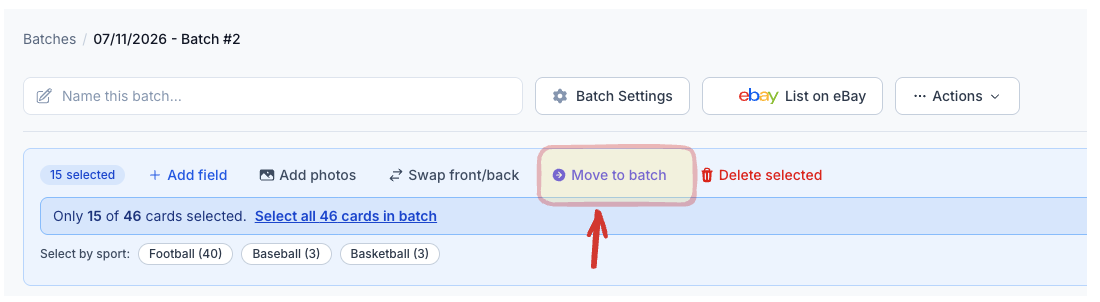
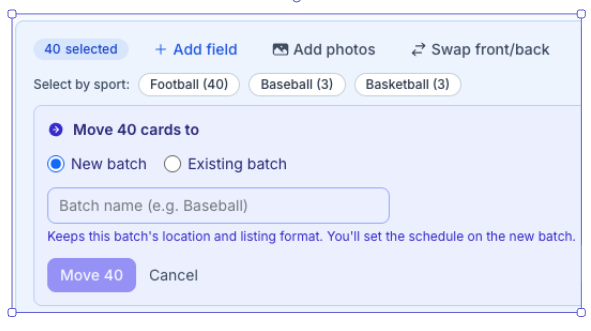
- Select by Sport, Then Move — Moving cards to a new or existing batch picked up per-sport quick-select, so pulling the football out of a mixed box is one click instead of forty checkboxes.
- “— None —” Clears the Parallel — The bulk-edit Parallel dropdown has a None option that actually clears the field across a selection. Previously you could set a parallel in bulk but not unset one.
When the ID Is Wrong
- “Not Quite Right?” — and 2 Credits for Telling Us — A link in the card edit header opens a correction form: tick what is off (player, set, year, variant, card number, not a card) and add a sentence if you have one. It reaches our review queue with the scan and the identification attached, so we can see why it went wrong instead of guessing. Every report adds 2 non-expiring identification credits to your account.
Everything Else
- Collapse the Sidebar to an Icon Rail — The left sidebar folds down to a 64px icon rail. On a laptop, that is a batch table column or two you get back.
- Sort the Batches List — Sort your batches by Batch Name, SKUs, or Tag, and the sort sticks across tab switches, search, pagination, and refresh.
- Card Table Sort Remembered Per Card Type — The sort column and direction you set for sports cards stay separate from the ones you set for CCG.
Version 2.5.0 Released
Two big ones this release: you can finally edit the cards inside a multi-variation listing without going to eBay, and every identified card now comes with what it actually sold for. Plus a run of card-entry fixes that take friction out of the batch screen.
Multi-Variation Listings
- Edit the Cards Inside a Listing from Inventory — Expand a multi-variation listing on the Inventory page and edit each card’s price and quantity right there, in line with the Price and Quantity columns. Previously you had to go into eBay to touch a single card inside a set.
- Set a Card’s Quantity to 0 — Mark one card in the set as sold out without pulling down the whole listing. The rest of the set stays live.
- Edit Each Card’s Pictures Inside the Listing — Swap or reorder the photos for one card in a set without rebuilding the listing.
Pricing Data on Your Cards
- Sold-Comp Prices as a Column Group — After a card is identified, CardLuma looks up what that exact card actually sold for and shows a recommended price, median, average, last sale price, last sale date, and how many sales it’s based on. You get a price to work from instead of guessing or opening eBay in another tab. Watch it in action →
Card Entry and Editing
- Custom Game for CCG Cards — Add your own game — something that isn’t in our list — on a CCG card, and it lists to eBay correctly end to end. You’re not blocked because your game isn’t in our dropdown.
- Your Custom Parallels in Bulk Edit — Parallels you’ve created for your account now show up in the bulk-edit Parallel dropdown, so you can apply one to fifty cards at once instead of one at a time.
- Card # and SKU Sort Like Numbers — Card 2 now sorts before card 10, and SKUs sort in the order you scanned them. Sorting a batch by card number finally gives you the order you expected.
- Collapse the Sales Data / eBay Panel on Card Edit — Fold that column away and the Title field gets the full width. Long titles are the thing you actually edit most, and now you can see all of it.
- Column Layouts Are Remembered Per Card Type — The columns you set up for sports cards stay separate from the ones for CCG. Switching card types no longer scrambles your table.
Card Identification
- Newly Released Sets and Parallels — We updated the multi-stage card identification pipeline to better identify newly released sets and parallels.
Fixes Worth Knowing About
- Split Batches Keep Their eBay Settings — Splitting a batch now carries the parent’s eBay settings and description template. Split batches used to lose them and list with the wrong template.
- Truncated Photo Uploads Are Rejected With a Reason — A photo whose bytes never all arrived used to save as a broken image. Now it’s refused and tells you why.
Version 2.4.0 Released
The most-requested feature on the board finally shipped: you can move cards between batches. Plus more fields in bulk edit and your card cost in the CSV export.
The Big One
- Move Cards Between Batches — You asked for this one more than anything else. Select cards in a batch and move them to a brand-new batch or an existing one in a single action. Scan a mixed box, then split the football off from the baseball. Pull the high-value cards into their own batch so they get their own pricing pass and their own schedule. Break up a batch that got away from you. The new batch keeps the source batch’s location and listing format, so you’re not rebuilding settings you already got right — you just set the schedule when you’re ready to publish. No re-scanning, no starting over.
More From This Release
- More Fields in Bulk Edit — Description and the per-card description note, secondary store category, parallel, and insert can all be set across a whole selection now. The fields you were still editing one card at a time, you aren’t anymore.
- Card Cost in the CSV Export — Your per-card acquisition cost now comes through in the CSV export. Cost, revenue, and fees in one spreadsheet — no second file to match up before you can see what a card actually made you.
Version 2.3.1 Released
Two small changes that take steps out of the day: name the batch where you start it, and check an image without opening the card.
New Features
- Batch Title on the New Batch Screen — There’s now a Batch Title box on the first New Batch screen. Name it “1955 Bowman Baseball” while you’re creating it instead of scanning first and renaming later. Forty batches deep, that name is how you find it.
- Quick Image Preview on Hover — Hover your mouse over a card’s image in the batch and a full preview pops up. Confirm you’re looking at the right card, or check a corner, without clicking into the card edit screen and clicking back out.
Version 2.3.0 Released
This release is dominated by one thing: the batch table now works like a spreadsheet. That’s where you spend your day, so we rebuilt it to move at the speed you do — click any cell to edit, tab across a row, and push one value to the whole batch. Plus a batch of pricing, category, and comp-search upgrades underneath it.
The Big One
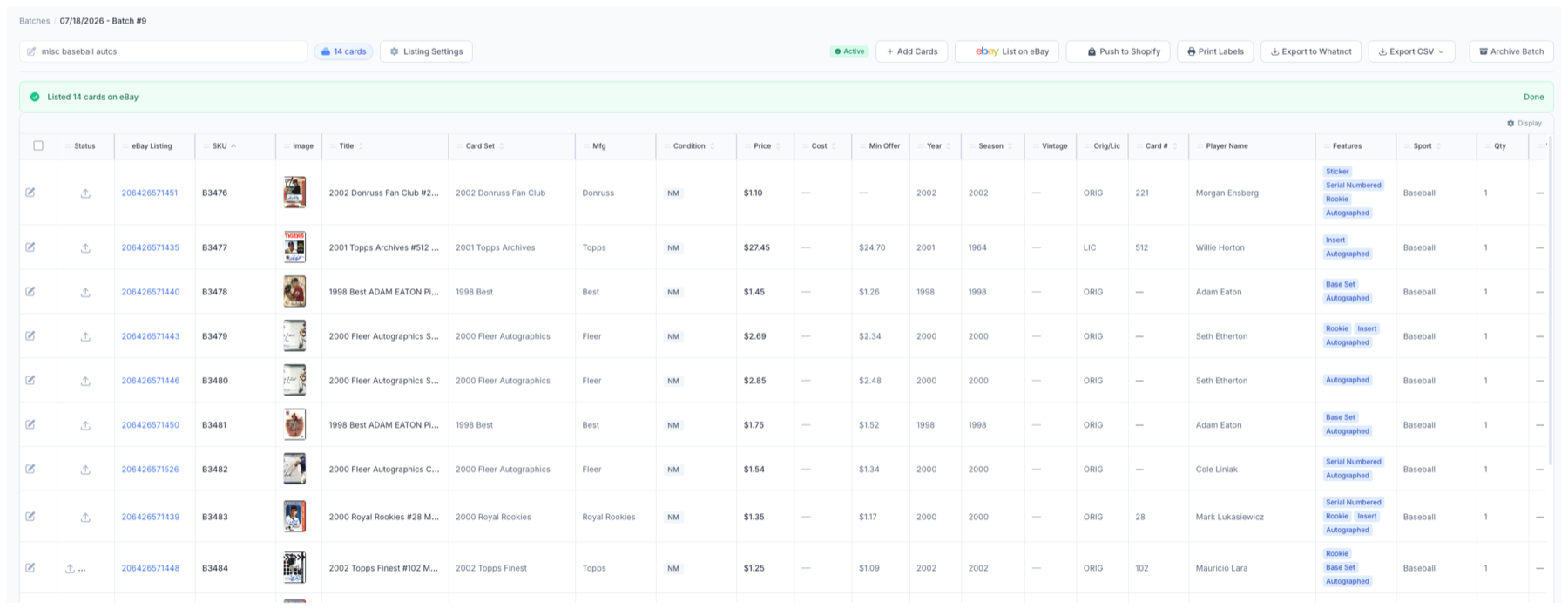
- The Batch Table Is Now a Spreadsheet — Click any cell to edit it in place. Move across the row with your keyboard the way you would in Excel, no mouse round-trip for every field. Pick from a dropdown where the field expects one, edit the campaign inline, and hit the per-row Edit button when you want the full card — a stray row click no longer yanks you off the table. The table also holds an exact, full-width layout now: drag the column separators to the widths you want, columns stop shifting when you click, and the scrollbars pin to the edge of the window instead of floating in the middle of your data.
More From the Table
- Copy to All — Set a field on one card, then push that value to every card in the batch in one move. Now covers Price and Quantity too. Weight only copies when it’s a real override, so an inherited package weight never overwrites the batch by accident.
- New Columns You Asked For — Material, SKU on inventory rows, Parallel, Team, and Description Template, the remaining CCG-only fields, and non-sports columns with inline tag editing — all editable right in the grid. The header now shows the batch name and card count so you always know which batch you’re in.
- Listing Settings, Out of Your Way — Listing Settings moved into a clean modal, and Review Cards and Bulk Edit moved up into the toolbar. Fewer panels crowding the table, the actions where your hand already is.
Cards & Pricing
- Store-Category Automation for Non-Sports Cards — Non-sports trading cards now get the same automatic store-category treatment as everything else — a primary category plus “Also Show In” secondaries. Anything categorized before this change is preserved and shown read-only so nothing gets rewritten under you.
- Secondary Store Category in Bulk Edit — Set the secondary eBay store category across a whole selection at once. The category picker is alphabetized now, and primary/secondary are labeled clearly so you pick the right one the first time.
- Serial Numbers for Non-Sports Cards — CardLuma now captures the print run (the /99, /250) on serial-numbered non-sports cards automatically, into its own field instead of the title or a note.
- Manual Minimum % Override on Tiered Best Offer — Running tiered Best Offer pricing but want to hand-set the minimum on a specific band? You can override the minimum percentage directly now instead of taking whatever the tier calculates.
Sales Data
- Search Comps as You Type — The sold-comps search now updates while you type. The box stays put, keeps focus, and only shows results for the query you actually finished — no more losing your place or watching a stale search flash by.
Fixes
- Inventory Breadcrumb & Sidebar — The inventory breadcrumb and sidebar highlight now point to where you actually are. Fixed.
Version 2.2.0 Released
Everything in this release started with feedback from dealers using CardLuma every day. The theme is straightforward: fewer repetitive steps, fewer mistakes to clean up, and more time spent listing cards.
The Big Ones
- Updated Feature Request System — Streamlined and moved out into its own spot in the sidebar. Submit a feature request directly from the application, see what other dealers have requested, and vote on what matters most to your operation. Track it from Under consideration to In Progress to Shipped, so you know where your request stands instead of guessing. It goes straight into the product queue instead of getting buried in an inbox.
- eBay Store Category Automation — Secondary store categories can now be assigned automatically, and team names can be matched directly to your store categories — one rule instead of thirty. If you have thousands of active listings, store categories are how buyers navigate your inventory. Assigning them by hand is also the kind of repetitive work that quietly eats an afternoon. Set the rules once. CardLuma organizes the inventory while you list it.
- Batch Table View — The batch table is where you spend your day. It should work like a tool you own, not a screen you tolerate. It now expands to fill the available screen, columns drag into the order you want, and widths size themselves automatically — or you set them yourself. Stop trying to review an 80-character title through a two-inch window.
Card Identification
- Serial-Numbered CCG and TCG Cards — CardLuma now identifies and populates serial-numbered CCG and TCG cards automatically. If you sell Pokémon, Magic, or other TCG alongside sports cards, you shouldn’t have to manually enter information the AI can already see. Serial numbers now have a proper field instead of being buried in notes or added to the title by hand. Cleaner data, better listings, and one less field to type.
Workflow Improvements
- Bulk Swap Front and Back Images — Scanned an entire batch backwards? Fix the whole batch in one action instead of correcting every card individually. Customer requested.
- PDF Label Quantities Match Inventory Quantities — If you have two of SKU 999, CardLuma prints two labels. Previously, you got one — and usually discovered it at the packing table. Customer requested.
- Visual Warning at eBay’s 80-Character Title Limit — See when a title is getting too long before you publish it, not after eBay truncates it.
- Cleaner Titles When the Sport Is Already in the Set Name — No more 2024 Topps Baseball Baseball. Every character in an eBay title is search real estate. This gives some of it back.
- More Best Offer Automation — Set your Auto-Accept and Minimum Best Offer rules once — one rule for every listing, or different rules by price band — then let CardLuma handle qualifying offers while you scan the next box.
Version 2.1.0 Released
The Big Ones
- Per-Card Profit & Loss Tracking — Gross sales aren’t profit. CardLuma now pulls your real eBay numbers — final value fees, promoted listing fees, shipping, refunds — and shows what you actually kept, per card, per order, and per period (7/30/90 days, YTD, or a custom range). Drill into every order in the detailed breakout, set your acquisition cost to get true margin, and export the whole P&L to CSV for your spreadsheet or your accountant.
- Real-Time Card Pricing Data — Price the card while you’re looking at it. Live eBay sold comps and active listings land right in the card edit screen — recent sale prices, price range, average, and where your card sits low to high. Works the same for sports cards and TCG singles, so it’s one pricing workflow across your whole inventory.
New Features
- Description Template Automation — Stop hand-picking a description for every card. Set priority-ordered rules and CardLuma chooses the right description template automatically — by price, graded status, and quantity — with a catch-all so nothing ships without one. Separate rule sets for Sports, CCG, and non-sports cards. (Thanks to the seller who asked for this one.)
- Bulk-Update Description Templates in a Batch — Set the description template across a whole batch of cards in one action instead of card by card. Pair it with the automation rules or use it on its own when you’d rather set things by hand.
Version 2.0.0 Released
The Big Ones
- The CardLuma Briefing — A daily, curated read on the card market, built for collectors and resellers. Marketplace moves, TCG/CCG news, risk, and a content hub — pulled from across the hobby, summarized, and filed by category. Every story comes with a plain-English “why it matters” and a CardLuma angle: what it actually means for how you buy, price, and list. Five minutes a morning instead of a dozen tabs.
- CardLuma Insider — Dealer-to-dealer guides and field notes for card sellers. Practical write-ups on the stuff that actually moves the needle — eBay store strategy, pricing, listing mechanics, shipping — written for operators, not beginners. Public articles plus members-only pieces for sellers running the platform.
New Features
- Custom Gallery Image for Multi-Variation Listings — Upload your own gallery image to replace the first card’s photos on a multi-variation listing’s main image. Lead with a clean set shot or a branded cover instead of whatever the first card happens to show. JPEG, PNG, or WebP, up to 2 MB.
- Order Variations by Card Number — Multi-variation eBay listings now sort their variations by card number, ascending. Buyers scan the drop-down in the order they expect — #1, #2, #3 — instead of hunting through a random list.
- Omit the Insert Image on Multi-Variation Listings — Drop the insert image entirely from a multi-variation eBay listing when you don’t want it. Full control over what shows on the listing, nothing forced in.
- Custom Batch Names — Give any batch a real name instead of living with “Batch #5.” Call it “1955 Bowman Baseball” and find it at a glance in your batches list. Edit it inline anytime. Forty batches deep, you finally know which is which.
- Feature-Request Voting — Vote on what we build next, right from the Get Help panel. See what’s under consideration and what’s in progress, then put your weight behind the requests that matter to your operation. The roadmap is yours to push on.
Version 1.9.7 Released
The Big Ones
- Up to 20 Additional Photos Per Listing — Front and back covers most cards, but higher-value cards need more. Now you can add up to 20 extra photos per listing — corner close-ups, edges, surface, autographs, serial numbers — on top of the standard front and back scans. Drag to reorder, remove with one click, and they publish straight to eBay with the listing. (Thanks for the idea, and to the seller who asked for it — great call.)
Version 1.9.5 Released
The Big Ones
- Big Jobs Run in the Background — Bulk edits across hundreds of cards, CSV exports, and pushing listings to eBay no longer pin you to a loading screen. These jobs now run in the background, so you keep working while CardLuma finishes the heavy lifting and tells you the moment it’s done. Large batches that used to drag are now fast and reliable.
- Up to 250 Variations Per eBay Listing — Bundle up to 250 card variations into a single eBay listing — an entire set or a deep run of singles under one listing you can actually manage. Fewer listings to maintain, a cleaner storefront, and an easier buy for your customers.
New Features
- Auto-Renew Unsold Auctions — When an eBay auction ends without a buyer, CardLuma can relist it for you automatically. No manual relisting, no inventory sitting dark. Set it once and your listings keep working.
- Bulk-Edit the Game Field — Set the Game on a whole batch of Pokémon, Magic, Yu-Gi-Oh!, or other TCG cards in one move from the bulk-edit toolbar. The option shows up automatically for collectible card game batches — there when you need it, gone when you don’t.
- Bulk-Edit the Title Field — Update card Titles across your whole selection from the bulk-edit toolbar. Keep listings consistent without retyping one card at a time.
- Empty Trash — Deleted batches and cards now land in a Trash area you fully control. Review what’s there, remove individual items, or empty the whole thing in one click. A confirmation step keeps you from nuking something by accident — and once it’s gone, it’s gone for good.
Fixes
- Leading Zeros Preserved in SKUs — SKUs like 007123 keep their leading zeros all the way through eBay File Exchange CSV exports. Your labels match exactly what you typed — no more digits silently dropped when the file hits a spreadsheet.
Version 1.9.0 Released
The Big Ones
- eBay Variation Listings — Sell multiple versions of the same card under one listing.
New Features
- {grader} Title & Description Placeholder — New template placeholder that drops the grading company (PSA, BGS, SGC, etc.) straight into your titles and descriptions.
- {grade} Title & Description Placeholder — New placeholder for the numeric grade (10, 9.5, etc.). Pair it with {grader} for clean graded-card titles without retyping.
- Per-Card Description Note — Add a custom note to the top of a single card’s description without touching the rest of the batch. Flag the things specific to one card — “corners are soft on this one,” etc. — right where buyers see it first.
- Filter Listings by Store Category — The inventory UI now filters listings by eBay store category. Jump straight to the cards in a given category instead of scrolling your whole inventory. (Thanks for the suggestion, @fanzonenj)
UI
- Numbered SKU Ordering in Batch UI — The batch UI now shows numerical ordering for SKUs, so you can see exactly where each card lands in the sequence.
- “Season” Bulk Edit — Set the season across multiple cards in one action from the UI.
- “Card Set” Bulk Edit — Set the card set across multiple cards in one action from the UI.
Bug Fixes
Miscellaneous bug fixes based on user reports. Thanks for flagging them.
Version 1.8.0 Released
New Features
- Add Cards to an Existing Batch — Drop more cards into a batch you’ve already created. No need to spin up a new batch mid-session just to keep scanning.
- Bulk Delete from a Batch — Remove multiple items from a batch in a single action. Clear out duplicates and mistakes fast instead of deleting one card at a time.
- Edit Description Template After Batch Creation — Change a batch’s description template anytime, not just when you create it. Picked the wrong one? Swap it without starting over.
- {team_short} Title Placeholder — New template placeholder for the short team name or mascot (e.g. “Flyers”). Falls back to the full team name when no short name is set.
- {location} Title Placeholder — New placeholder that pulls the batch’s location field straight into your titles.
Improvements
- Mobile-Friendly Web — More work toward a fully mobile-friendly web app. Listing from your phone keeps getting smoother.
Bug Fixes
Miscellaneous bug fixes based on user reports. Thanks for flagging them.
Version 1.7.1 Released
New Features
- Mobile Image Upload via QR Code — Scan a QR code with your phone and upload card images straight from your mobile camera roll into the card edit UI. No more emailing photos to yourself or wrestling with file transfers. (Thanks for the suggestion, @SNS Trading Cards)
Version 1.7.0 Released
New Features
- Non-Sports Trading Cards Support — List non-sports trading cards through the same workflow you already use for sports and TCG. One platform, every card.
Bug Fixes
- Default Shipping Policy — Default shipping policy wasn’t saving. Fixed.
- Card Condition Saving — In the card-edit UI, card condition was intermittently not saving. Fixed.
We’re on Discord
New CardLuma Discord server is live. Trade tips, ask questions, share what’s working, and talk shop with other dealers running the platform. Drop in, say hey.
Version 1.6.0 Released
New Features
- Per-Card Overrides — Description template, weight, and SKU can now be set per card instead of always inheriting from account or batch defaults. Defaults still apply when you don’t set them. Override only the cards that need it.
- Bulk SKU — Set one SKU across every card in a batch in a single action. New account-level static SKU mode runs the same SKU across your whole inventory, with per-batch override when you need to break the pattern.
- Store-Category Automation by Card Type — Independent automation rules for Sports vs. TCG/CCG. List both out of one workflow without your sports rules stepping on your Pokémon ones.
- eBay FIXED Campaign Overrides — Per-ad bid percentage overrides now submit correctly on FIXED Promoted Listings campaigns.
UI
- Image Tools Always Visible — Rotate and replace image buttons in the card edit UI stay on screen and are brighter. Stop hunting for them.
- Tighter Field Pairing — In card edit, store categories now sit next to shipping and weight; description sits next to campaign. The fields that move together are now near each other.
- Card Type Toggle in Settings — The store-category automation form re-processes when you switch card type, so Sports and TCG configurations stay clean.
Version 1.5.0 Released — It’s Finally Here
The Big One
- Trading Card Games (TCG/CCG) Support — The most-requested feature in CardLuma history. You asked. A lot. We built it. Pokémon TCG, Magic: The Gathering, Yu-Gi-Oh!, Lorcana, One Piece, Flesh and Blood, Digimon, Weiss Schwarz — all lit up out of the gate. Pick Card Type on batch creation, scan the card, and CardLuma fills the right eBay Item Specifics for the right game: Game, Set, Card Number, Rarity, Card Type, Finish, Illustrator, Specialty, Age Level, Language, Characters, Features, Franchise, Convention/Event, Graded, Autographed — the fields buyers actually filter by. Same title builder. Same eBay Market Data. Same automation rules. Same publishing pipeline. Your sports card workflow, now with Charizards. Stop running two tools. List everything in one place.
Why this one matters
Most of you sell more than just sports cards. You’ve been running a second tool (or worse, doing TCG listings by hand) because no scan-to-listing platform handled both well. That’s over. One workflow. One inventory. One pricing plan. Every card you own, listed the CardLuma way.
Version 1.4.1 Released
New Features
- Cards Per Interval — Push multiple cards per scheduled interval instead of one at a time. Set it to 5 with a 10-minute interval and CardLuma drops 5 listings every 10 minutes. Leave it blank and scheduled listings behave like before. (Thanks for the suggestion, @DitsyCards)
Version 1.4.0 Released
New Features
- eBay Inventory Management — Your full eBay inventory inside CardLuma. View active and sold listings without leaving the app.
- Inline Editing — Edit prices and fields directly in the table. No drilling into individual listings.
- Bulk Edits — Apply changes across multiple listings at once. Select, edit, done.
- Bulk Delisting — End multiple active listings in a single action. Pull inventory off eBay fast when you need to.
- Bulk Relisting — Push ended listings back to eBay in bulk. Bring stock back live without re-creating listings one at a time.
- CSV Export — Export your eBay inventory to CSV for accounting, reporting, or whatever else you run on the side.
- Customizable Columns — Pick which columns show in the inventory table. See what matters to you, hide what doesn’t.
- One-Click Sync — Pull the latest from eBay on demand. Inventory stays current without waiting on background jobs.
Version 1.3.3 Released
New Features
- eBay Advertising Campaigns — Sync your eBay Promoted Listings campaigns directly into CardLuma. Set a campaign at the batch level so every card gets promoted automatically, or override on individual cards when you want a different strategy. You only pay a percentage of the total sale amount when the promoted item sells after a click on your ad.
Version 1.3.1 Released
New Features
- Front/Back Image Swap — Swap front and back card images directly in the card edit UI. One click, no re-scanning.
- Improved Bulk Edit Toolbar — The bulk edit toolbar on the batch detail page is now more visually prominent, so you always know when bulk actions are available.
Improvements
- Hologram Matching Accuracy — Tweaked the hologram matching algorithm for more accurate card identification.
Version 1.3.0 Released
New Features
- eBay Market Data — Real eBay sold prices, price ranges, and recent sales for any card — pulled directly into your listing workflow. Stop guessing what a card is worth.
- Image Watermark — Add a branded watermark bar to every card image automatically. Custom text, optional logo, zero extra work per listing.
- Spread Listings Across Days — Instead of flooding eBay in one afternoon, spread listings across a week. Set a daily limit and CardLuma handles the rest. (Thanks for the suggestion, @CardZooSportsCards)
- Secondary Store Category — Assign both primary and secondary eBay store categories to every listing. More browse paths, more visibility, same workflow. (Thanks for the suggestion, @CardZooSportsCards)
- Custom Date Picker — Filter your eBay traffic and sales stats by any date range. Presets for common windows, plus a full custom picker for drilling into specific periods.
- Custom Parallel Buttons — Define your own parallels, set abbreviations for titles, and pin your most-used variants as quick-add buttons.
- Max File Size Increased to 10 MB — Upload card images up to 10 MB per card.
Bug Fixes
Miscellaneous bug fixes based on user reports. Thanks for flagging them.
Version 1.2.1 Released
New Features
- Bulk Editing Fields — Edit fields across multiple cards at once. Select a batch, change a value, apply to all. No more clicking into each card one at a time.
- Keyboard Shortcuts — Set card condition and inject title text with a single keystroke. Fully customizable shortcuts for condition grades, custom conditions, and title placeholders.
- Listing Branding — Automatically stamp every eBay listing with your store logo. Build recognition and stand out in search results without any extra work.
Version 1.2.0 Released
New Features
- Batch Tags — Label every batch with a custom tag — sport, project, client, whatever keeps your operation organized. Create tags in Account Settings, assign them when you create a batch, and see them right in your active batches list. Sixty batches deep and you still know what’s what.
Getting Started
We made a walkthrough video. Sign up, connect eBay, scan a card, publish a listing — all in under 5 minutes. We timed it. Twice. It checks out.
We’re on Facebook. Come join the community and stay in the loop on what’s coming next.
Version 1.1.0 Released
New Features
- Store Category Matcher — Automatically assign eBay store categories to your listings. One less thing to think about.
- Smarter Card Identification — Improved matching accuracy for cards with letter variations.
- SKU Label Templates — Print-ready SKU labels directly from CardLuma. Batch print and ship faster.
- eBay Dashboard Stats — See your selling performance at a glance, right inside CardLuma.
Version 1.0.9 Released
New Features
- Image Rotation — Rotate card images directly in the pairing UI.
- Auction End Time Tips — New help guidance to pick optimal auction end times.
- Activity History — Full tracking of changes to your card records. See who changed what and when.
- Direct eBay Listing via API — Push listings straight to eBay without leaving CardLuma. This is the big one.
Version 1.0.8 Released
New Features
- Two-Factor Authentication — Keep your account secure with an extra layer of protection.
- Quick Delete — New trash button on the card record UI for faster cleanup.
- Batch Card Search — Search across cards within a batch. Find what you need instantly, even in large batches.
- Auction Format Support — List as auction or fixed price — your call.
Version 1.0.7 Released
New Features
- News & Help in the Sidebar — Stay up to date and get answers without leaving your workflow.
- Scheduled Listings — Set it and forget it. Schedule listings to go live on your timeline with customizable intervals.
- Card Edit UI Overhaul — Brand new 3-column layout. More info visible, fewer clicks, faster flow.
Version 1.0.6 Released
New Features
- Automatic Hall of Fame Detection — HOF status now auto-populates. No more manual lookups.
- Automatic Rookie Card Detection — RC flags set automatically from our catalog data.
- Condition Guidelines — Built-in eBay condition reference so you grade consistently every time.
- SEO Field Hints — See which card attributes drive eBay search traffic so you stop leaving visibility on the table. PS: We set all of them for you automatically.
- Custom Card Conditions — eBay only has four conditions. If you grade more granularly than that, create your own and map them to whichever eBay condition fits closest.
Version 1.0.5 Released
New Features
- Graded Card Support — Full graded card fields now available in the card editor — PSA, BGS, SGC, and more.
- Market Movers Pricing — One-click price comp lookups from the card edit screen.
- Shipping Automation — Automatically assign shipping policies based on listing criteria you define.
Version 1.0.4 Released
New Features
- Automatic Title Builder — Template-based titles generated automatically.
- eBay Store Policy Sync — Automatically sync your shipping, refund, and return policies.
- Store Category Sync — Automatically sync your eBay store categories.
- Best Offer Automation — Set rules to auto-accept or decline best offers.
Version 1.0.3 Released
New Features
- Combined Front + Back Images — Front and back card photos automatically merged into a single image for your eBay listing. Both sides in the thumbnail, every card, every time.
Version 1.0.2 Released
New Features
- Customizable eBay Business Policies — Create reusable package profiles for package dimensions, weight, and ship-from location.