What CardLuma Does
List more cards with less cleanup.
CardLuma helps serious card sellers turn scans into complete eBay-ready listings faster, with better identification, cleaner data, repeatable rules, and professional listing output.
If any of this sounds familiar…
Move from scan to listing faster.
CardLuma is built for throughput: upload images, identify cards, generate listing data, and publish without bouncing between tools or apps. The whole workflow is engineered around how dealers actually list at volume.
Sub-5-Second Identification
Image upload to complete listing draft in under 5 seconds per card.
Batch Image Upload
Upload multiple card images at once and run them through the AI identification pipeline together.
Mobile Image Upload
Scan a QR code and shoot cards with your phone — photos stream straight into the batch, live, with no emailing files to yourself or wrestling with transfers.
Direct eBay Listing
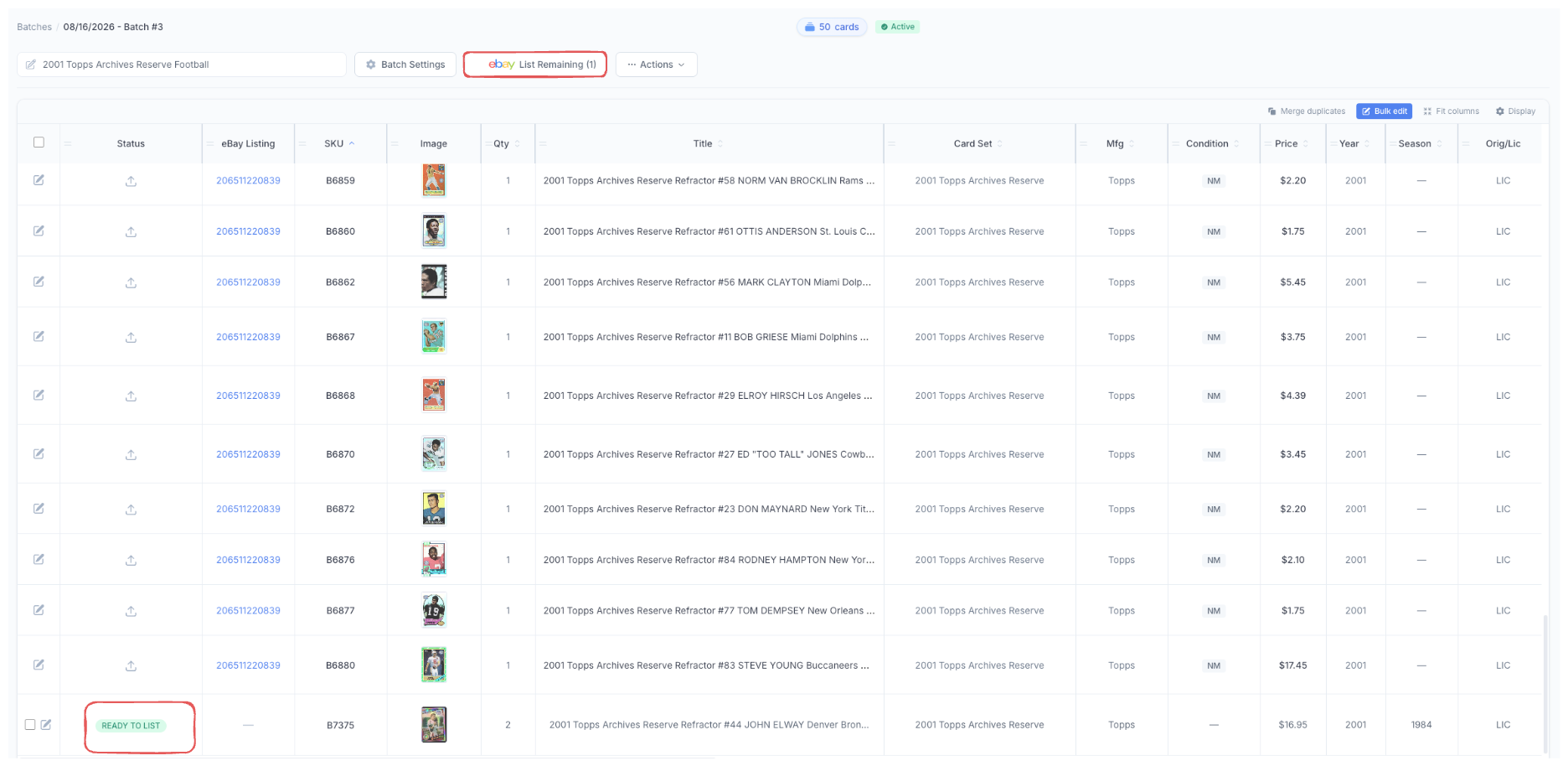
One-button publish to eBay via API. eBay listing IDs link back to your CardLuma listings after publishing.
Shopify Integration
Push your scanned cards straight into your Shopify store from the same workflow. One scan, one inventory, two sales channels — no more maintaining your Shopify catalog by hand.
Multi-Variation Listing
List an entire batch as one eBay listing with up to 250 variations — buyers pick the card by number from a dropdown. A shared parent holds the category, title, description, and policies; each card becomes a variation the buyer selects.
eBay CSV Export
Export listings as CSV files compatible with eBay’s File Exchange for bulk upload.
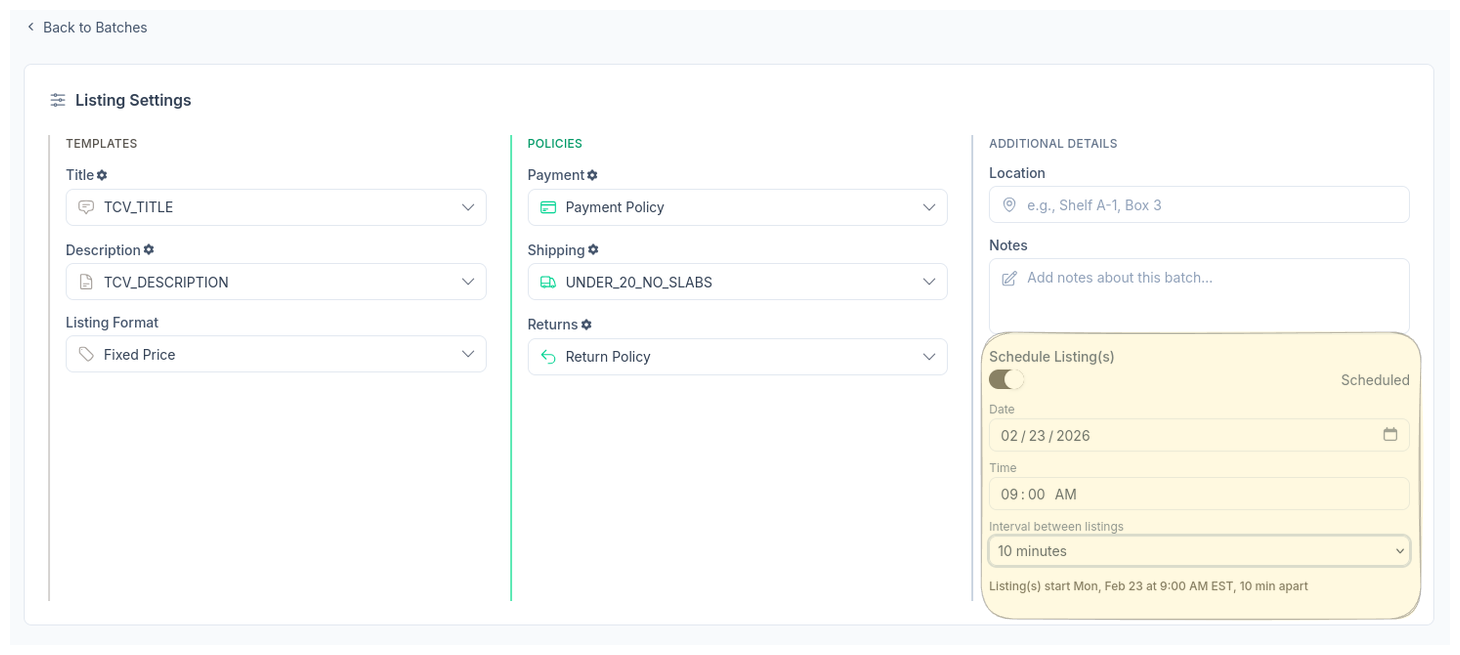
Scheduled Listings
Queue listings with specific dates, times, and intervals between each. Stagger publishing for maximum search visibility.
Spread Across Days
Distribute a batch of scheduled listings across multiple days with a configurable cards-per-day limit.
Cards Per Interval
Set how many cards publish per scheduling interval — drip-feed listings into eBay search instead of dumping a whole batch at once.
Batch Card Search
Search across all batches by player name, SKU, or set. Results show batch context, SKU, and set for quick navigation.
Quick Delete
Remove cards from a batch with a single action. No confirmation dialogs slowing you down.
Sub-1-Second Page Loads
Server-rendered pages delivered through Cloudflare’s global CDN for consistently fast performance.
Fast Onboarding
Sign up to first listing in under 5 minutes. Connect your eBay account and start scanning.
Get the card right before the listing goes live.
Speed only matters if sellers trust the output. The value in a card is often hidden in the details — rookie status, parallel, serial number, autograph, grade, set, team, and card number. CardLuma reduces missed details and listing errors at every step.
Multistage Card Identification
Four-stage AI pipeline: Image Upload & Analysis, AI Identification, Database Verification, and Complete Listing Generation.
10M+ Card Database
AI identification runs against a curated database of over 10 million sports card records covering years, sets, parallels, and inserts.
99.8% Identification Accuracy
Multi-candidate ranking with confidence scoring. The system presents the best match plus alternatives when multiple candidates exist.
20+ Auto-Filled Item Specifics
Player, year, set, card number, sport, team, parallel, RC, HOF, autograph, serial, card size, language, league, season, graded/ungraded, and more.
Automatic RC Detection
Cross-references the card database to flag Rookie Cards. RC status lands in your title and Item Specifics automatically.
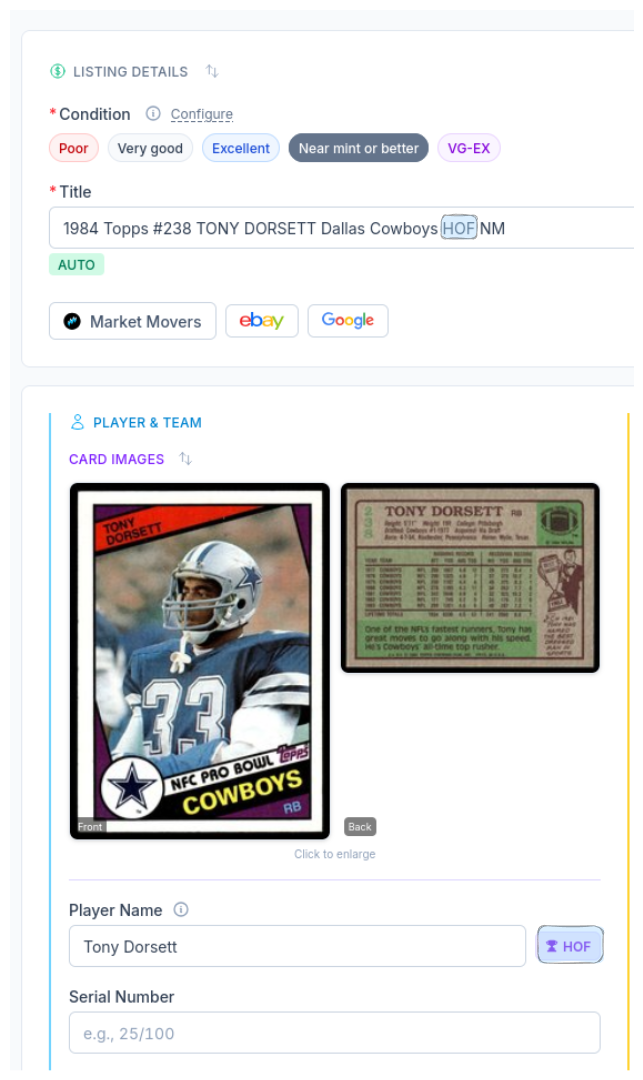
Automatic HOF Detection
Tags Hall of Famers for Baseball, Basketball, and Football. HOF status feeds titles and store category automation rules.
Serial Number Detection
Identifies and highlights serial-numbered cards. Value-driving attributes are surfaced front and center in your listing.
Parallel Recognition
Distinguishes Base from Prizm Silver, Gold Wave, and other parallels. No more guessing which variant you’re holding.
Custom Parallel Buttons
Define your own parallel names, set title abbreviations, and pin up to 12 as quick-add buttons. Drag to reorder.
Auto Autograph Detection
Autograph callouts land in your listing automatically when a signed card is identified.
Graded Card Support
Dedicated fields for PSA, BGS, and SGC grades. Grading company and grade are captured in your listing data.
Condition Guidelines
Built-in eBay condition reference (Near Mint, Excellent, Very Good, Poor) inline while you’re grading cards.
Data Validator
Pre-publish validation catches missing or incomplete fields before your listing goes live on eBay.
Duplicate Listing Safeguards
Built-in checks prevent accidentally listing the same card twice on eBay.
Grading Cert Verification Coming Soon
Verify PSA and SGC certification numbers directly during the listing process.
Automate the repetitive eBay work.
Efficiency isn’t just speed — it’s removing repeated seller decisions. CardLuma is a rules engine for eBay sellers: define how you list once, then let the system apply it across every card, every batch, every day.
Automatic Title Builder
Template-driven titles using conditional placeholders for set, number, player, team, HOF, features, and condition. Live preview with character count.
Smart Title Optimization
When titles exceed eBay’s 80-character limit, CardLuma auto-abbreviates team names to preserve high-value keywords like player, set, parallel, and RC.
Team Name Abbreviations
Choose from 30K+ curated team abbreviations or define your own.
Custom Title Templates
Multiple title templates with different conditional placeholder arrangements for different card types or listing strategies.
{grader} & {grade} Placeholders
New title and description placeholders for the grading company (PSA, BGS, SGC) and the numeric grade. Build clean graded-card titles without retyping.
Custom Description Templates
Reusable description templates standardize listing descriptions across all cards.
Per-Card Description Note
Add a custom note to the top of a single card’s description without touching the rest of the batch — flag the things specific to one card, right where buyers see it first.
Live Title Preview
See exactly how your title will appear on eBay as you build it, with a real-time character count toward the 80-character limit.
SEO Field Hints
Monthly eBay search volume per field shown in tooltips. Flags which fields improve listing visibility so you know which data matters most.
Store Category Automation
Priority-ordered rules route every listing into the correct eBay Store category based on player, sport, HOF status, and other attributes.
Store-Category Automation by Card Type
Independent rule sets for Sports vs. TCG/CCG. List both out of one workflow without your sports rules stepping on your Pokémon ones.
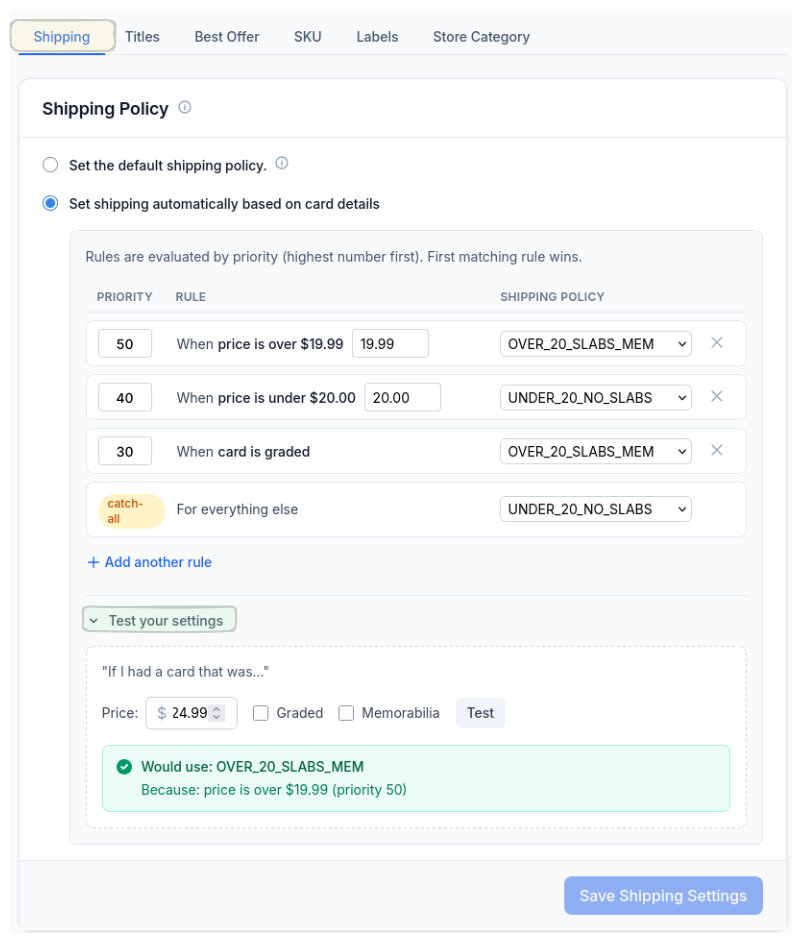
Shipping Policy Automation
Rules based on price, card type, graded status, or any combination. Auto-assigns the correct shipping policy with a built-in tester.
Best Offer Automation
Set price thresholds and minimum offer percentages. CardLuma auto-calculates dollar amounts and pre-fills Best Offer fields on every listing.
eBay Policy Sync
One-click sync of payment, shipping, and return policies from your eBay store. No duplicate configuration, no drift.
Store Category Sync
Pull eBay store categories directly into CardLuma. Works hand-in-hand with Store Category Automation rules.
Batch Policy Defaults
Set default payment, shipping, and return policies at the batch level. Policies auto-apply to every card in the batch.
Package Profiles
Save package dimensions, weight, and ship-from location as reusable profiles. Apply to listings without re-entering details.
Advertising Campaigns
Sync eBay Promoted Listings campaigns into CardLuma. Set a campaign at the batch level and override per card.
FIXED Campaign Bid Overrides
Per-ad bid percentage overrides submit correctly on FIXED Promoted Listings campaigns — tune individual cards without unwinding the whole campaign.
Bulk SKU
Set one SKU across every card in a batch in a single action. Account-level static SKU mode runs the same SKU across your whole inventory.
Season & Card Set Bulk Edit
Set the season or card set across multiple cards in one action from the inventory UI — no card-by-card editing.
Numbered SKU Ordering
The batch UI shows numerical ordering for SKUs, so you can see exactly where each card lands in the sequence.
Filter Listings by Store Category
Filter your inventory by eBay store category. Jump straight to the cards in a given category instead of scrolling your whole inventory.
Per-Card Overrides
Description template, package weight, and SKU can be set per card. Defaults still apply when you don’t set them — override only the cards that need it.
Card Edit UI
Three-column card editing layout. All listing fields visible without scrolling or tab-switching.
eBay Market Data
Real eBay sold prices, price ranges, and recent sales pulled into the card edit screen. Color-coded rows show where each sale lands relative to the median.
Market Movers Pricing
One-click price comp lookups from the card edit screen. Pre-filled search pulls recent sales from eBay and other marketplaces.
eBay Dashboard Stats
Traffic, feedback scores, INAD/INR rates, and seller standards on one screen. Filter by 7/30/90 days, YTD, or any custom range.
Every CardLuma plan includes the full platform. Pick your scan volume; keep the automation.
Make every listing follow your rules.
Once a dealer has more than a few hundred cards, the problem becomes operational consistency. Titles, descriptions, categories, shipping policies, SKUs, labels, conditions, branding, and offer rules all need to behave the same way every time.
Custom Title Templates
Lock in a title structure once and apply it across every card. Different templates for different card types or strategies.
Custom Description Templates
Standardize descriptions across your entire store. Reusable templates with dynamic fields.
Store Category Automation
Priority-ordered rules send every card to the right category, every time.
Shipping Policy Automation
Same logic, every card. No more manually picking the right shipping policy or guessing on rate cards.
Best Offer Automation
Auto-accept thresholds and minimum offers applied uniformly. Your offer rules don’t drift card to card.
Batch Policy Defaults
Set payment, shipping, and return policies at the batch level. Policies auto-apply to every card.
SKU Generation
Unique SKU automatically generated for every listing. Links eBay sales back to your inventory.
SKU Label Templates
Print-ready label templates with dynamic fields (SKU, set, player, team, serial, condition, logo). Batch printing supported.
Batch Tags
Organize and filter batches by sport, project, or any label you define — your inventory, your categories.
Custom Card Conditions
Custom condition labels (VG-EX, EX-MT, etc.) mapped to eBay’s four condition categories. Abbreviation appears automatically in your title.
Team Name Abbreviations
30K+ curated abbreviations or define your own. Same team always shortens the same way.
Custom Parallel Buttons
Pinned, named, abbreviated. Your most-used parallels behave the same on every card.
Package Profiles
Saved dimensions, weight, and ship-from location applied uniformly across listings.
eBay Policy Sync
Single source of truth for payment, shipping, and return policies — pulled from your eBay store, no drift.
Activity History
Track changes and actions taken on your listings over time.
Secondary Store Category
Assign a second eBay Store category to any listing. Two browse paths without duplicating the listing.
Listing Branding
Stamp every listing with your store branding. Build recognition and signal professionalism on every search result.
Image Watermark
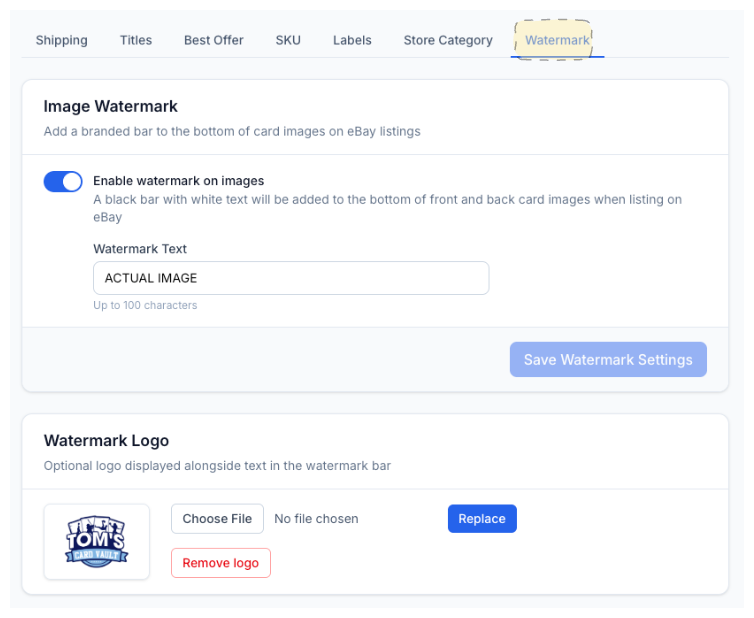
Add a branded bar with custom text and your store logo to every card image automatically.
Publish cleaner, more professional listings.
CardLuma listings should look complete, searchable, professional, and trustworthy. This is where features connect to seller outcomes — more complete listings, better buyer confidence, stronger search visibility, and a more polished store.
Combined Front + Back Images
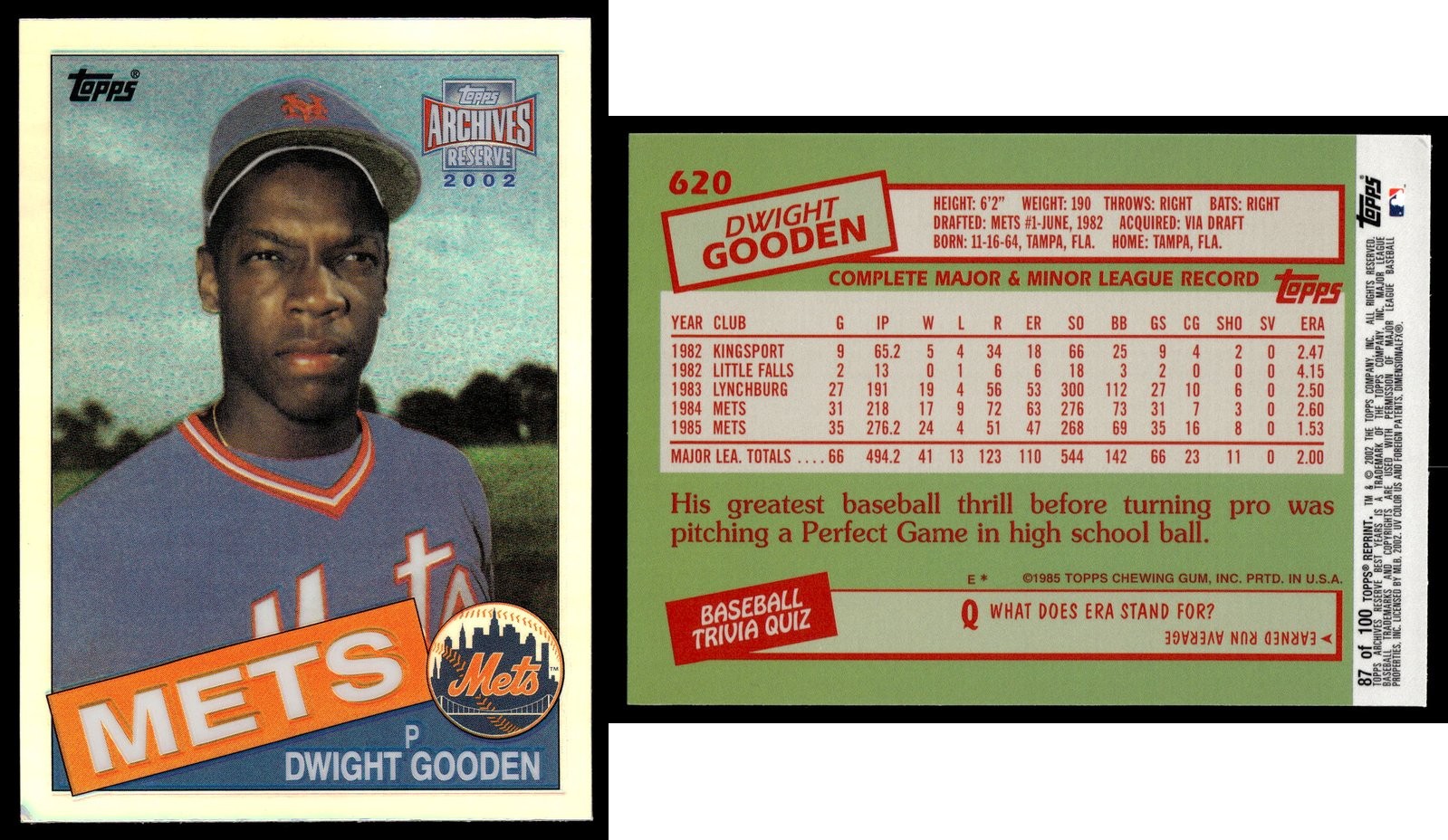
Automatically combines front and back card photos into a single composite image for eBay listings.
Additional Listing Photos
Add up to 20 extra photos per listing on top of the front and back — corner close-ups, edges, surface, autographs, and serial numbers. Drag to reorder, remove with one click.
Image Rotation
Rotate card images directly within the listing workflow. No external image editing tools needed.
Image Watermark
Branded bar with custom text and store logo on every card image. Enable once — every listing gets watermarked.
Listing Branding
Automatic store-branded listings build recognition and stand out in search results.
Live Title Preview
See your title exactly as it’ll appear on eBay before you publish.
Smart Title Optimization
Stay under eBay’s 80-character limit without losing high-value keywords.
SEO Field Hints
Search-volume tooltips show which item-specifics fields actually drive eBay visibility.
20+ Auto-Filled Item Specifics
Empty item specifics suppress search exposure. CardLuma fills the fields buyers and eBay search rely on.
Custom Description Templates
Polished, consistent descriptions across every listing.
Custom Card Conditions
Clear, consistent condition labels buyers recognize.
Condition Guidelines
Built-in eBay condition reference. Grade with confidence, in line with eBay standards.
eBay Market Data
Price with confidence using real eBay sold prices and recent sales right next to the card.
Market Movers Pricing
One-click comp lookups across eBay and other marketplaces from the card edit screen.
Auction Format Support
Fixed Price or Auction with 1, 3, 5, 7, or 10-day durations. Batch-level format settings with calculated end times.
Auction End Time Tips
Built-in guidance on optimal auction end times across US time zones for maximum bidding activity.
Advertising Campaigns
Promoted Listings sync — the visibility lever, applied per batch or per card.
Two-Factor Authentication
Secure your CardLuma account with 2FA for an extra layer of protection.
Privacy-First Analytics
Zero third-party ad trackers. Privacy-respecting Cloudflare Web Analytics only.
Contextual Help
Context-specific help screens throughout the app. Get guidance exactly where you need it.
Best Practice Guides
Built-in guides for eBay listing best practices — titles, pricing, shipping, and more.
Dev Team Support
Direct access to the development team for questions, issues, and feature requests. No ticket queues or chatbots.
Full feature index
Every CardLuma feature, grouped by category. Use this as a reference if you’re comparing platforms or looking for something specific.
AI Card Identification & Database
| Trading Card Games (TCG/CCG) Support | List 165+ CCG/TCG titles on eBay — Pokémon TCG, Magic: The Gathering, Yu-Gi-Oh!, Disney Lorcana, One Piece, Flesh and Blood, Digimon, Dragon Ball Super, and more. Pick Card Type on batch creation — CardLuma locks in the right identification pipeline, eBay category, and Item Specifics for the game you’re listing. |
| Non-Sports Trading Cards Support | List non-sports trading cards through the same scan-to-listing workflow you already use for sports and TCG. One platform, every card. |
| Multistage Card Identification | Four-stage AI pipeline: Image Upload & Analysis, AI Identification, Database Verification, and Complete Listing Generation. Combines OCR, visual pattern matching, and parallel/insert detection. |
| 10M+ Card Database | AI identification runs against a curated database of over 10 million sports card records, covering years, sets, parallels, inserts, and more. |
| Auto-Filled Item Specifics | Over 20 eBay Item Specifics fields populated automatically from identification results, including player, year, set, card number, sport, team, parallel, card size, material, vintage/modern, language, league, season, graded/ungraded, autographed, and more. |
| Automatic HOF Detection | Automatically tags Hall of Famers for Baseball, Basketball, and Football. HOF status feeds into titles and store category automation rules. |
| Automatic RC Detection | Cross-references the card database to flag Rookie Cards, ensuring RC status lands in your title and Item Specifics. |
| Serial Number Detection | Identifies and highlights serial-numbered cards. Value-driving attributes are surfaced front and center in your listing. |
| Parallel Recognition | Distinguishes Base from Prizm Silver, Gold Wave, and other parallels. No more guessing which variant you're holding. |
| Custom Parallel Buttons | Define your own parallel names, set title abbreviations, and pin up to 12 as quick-add buttons. Drag to reorder so your most-used variants are always first. |
| Auto Autograph Detection | Autograph callouts land in your listing automatically when a signed card is identified. |
| Graded Card Support | Dedicated fields for PSA, BGS, and SGC grades. Grading company and grade are captured in your listing data. |
| 99.8% Identification Accuracy | Multi-candidate ranking with confidence scoring. The system presents the best match and alternatives when multiple candidates exist. |
| Sub-5-Second Identification | Full card identification completes in under 5 seconds per card, from image upload to complete listing draft. |
| Grading Cert Verification Coming Soon | Verify PSA and SGC certification numbers directly during the listing process. |
Listing Titles & Descriptions
| Automatic Title Builder | Template-driven title generation using conditional placeholders for card set, number, player, team, HOF status, features, condition, etc etc. Did we mention live preview with character count? |
| Smart Title Optimization | When titles exceed eBay's 80-character limit, CardLuma automatically abbreviates team names to preserve high-value keywords like player, set, parallel, and RC. |
| Team Name Abbreviations | Choose from 30K+ curated team abbreviations or define your own. |
| Custom Title Templates | Create multiple title templates with different (conditional) placeholder arrangements for different card types or listing strategies. |
| Custom Description Templates | Build reusable description templates for your eBay listings. Standardize your listing descriptions across all cards. |
| Edit Description Template After Batch Creation | Change a batch’s description template anytime, not just when you create it. Picked the wrong one? Swap it without starting over. |
| Per-Card Description Note | Add a custom note to the top of a single card’s description without touching the rest of the batch. Flag the things specific to one card — “corners are soft on this one,” etc. — right where buyers see it first. |
| {grader} & {grade} Placeholders | Title and description placeholders for the grading company (PSA, BGS, SGC, etc.) and the numeric grade (10, 9.5, etc.). Pair them for clean graded-card titles without retyping. |
| {team_short} Title Placeholder | Drops the short team name or mascot (e.g. “Flyers”) into your title. Falls back to the full team name when no short name is set. |
| {location} Title Placeholder | Pulls the batch’s location field straight into your titles. |
| Live Title Preview | See exactly how your title will appear on eBay as you build it, with a real-time character count toward the 80-character limit. |
eBay SEO & Item Specifics
| 20+ Auto-Filled Item Specifics | Player, year, set, card number, sport, team, parallel, RC status, HOF, autograph, serial number, card size, material, vintage/modern, language, league, season, graded/ungraded, and more — all populated from AI identification. |
| SEO Field Hints | Shows monthly eBay search volume per field in tooltips. Flags which fields improve listing visibility so you know which data matters most. |
Images
| Combined Front + Back Images | Automatically combines front and back card photos into a single composite image for eBay listings. |
| Image Rotation | Rotate card images directly within the listing workflow. No need for external image editing tools. |
| Front/Back Image Swap | Swap the front and back card images directly in the card edit UI. One click, no re-scanning. |
| Batch Image Upload | Upload multiple card images at once for batch processing through the AI identification pipeline. |
| Mobile Image Upload via QR Code | Scan a QR code with your phone and upload card images straight from your mobile camera roll into the card edit UI — no emailing photos to yourself. |
| 10 MB Image Uploads | Upload card images up to 10 MB per card. |
| Image Watermark | Add a branded bar with custom text and your store logo to every card image automatically. Enable once in settings — every listing gets watermarked from that point on. |
| Listing Branding | Automatically stamp every listing with your store branding — build recognition, signal professionalism, and stand out in search results. |
Rule-Based Automation
| Store Category Automation | Priority-ordered rules route every listing into the correct eBay Store category based on player, sport, HOF status, and other attributes. Condition stacking supported; first matching rule wins. |
| Store-Category Automation by Card Type | Run independent rule sets for Sports vs. TCG/CCG. List both out of one workflow without your sports rules stepping on your Pokémon ones — the right ruleset fires automatically based on the card type. |
| Shipping Policy Automation | Define rules based on price, card type, graded status, or any combination. CardLuma auto-assigns the correct shipping policy. Includes a built-in tester and catch-all safety net default. |
| Best Offer Automation | Set price thresholds and minimum offer percentages. CardLuma auto-calculates minimum dollar amounts and pre-fills Best Offer fields on every listing. |
eBay Integration & Sync
| eBay Policy Sync | One-click sync of payment, shipping (fulfillment), and return policies from your eBay store. No duplicate configuration, no drift. |
| Store Category Sync | Pull your eBay store categories directly into CardLuma. Works hand-in-hand with Store Category Automation rules. |
| Secondary Store Category | Assign a second eBay Store category to any listing. Your card appears in two browse paths without duplicating the listing. |
| Advertising Campaigns | Sync your eBay Promoted Listings campaigns into CardLuma. Set a campaign at the batch level and override per card. You only pay a percentage of the sale when the promoted item sells after an ad click. |
| FIXED Campaign Bid Overrides | Per-ad bid percentage overrides submit correctly on FIXED Promoted Listings campaigns. Tune the bid for individual cards inside a fixed-rate campaign without unwinding the whole campaign setup. |
| Package Profiles | Save package dimensions, weight, and ship-from location as reusable profiles. Apply to listings without re-entering details. |
| Batch Policy Defaults | Set default payment, shipping, and return policies at the batch level. Policies auto-apply to every card in the batch. |
Publishing & Scheduling
| Direct eBay Listing via API | One-button publish directly to eBay via API. eBay listing IDs link back to your listings after publishing. |
| Shopify Integration | Push your scanned cards straight into your Shopify store from the same workflow you already use. One scan, one inventory, two sales channels — no more maintaining your Shopify catalog by hand. |
| eBay Variation Listings | Sell multiple versions of the same card under one fixed-price listing. A shared parent holds the category, title, description, business policies, and shared item specifics; each child option carries its own selector values, SKU, price, quantity, and optional photos. Requires a variation-supported eBay category. |
| eBay CSV Export | Export your listings as CSV files compatible with eBay's File Exchange for bulk upload. |
| Scheduled Listings | Queue up listings with specific dates, times, and intervals between each. Stagger publishing for maximum eBay search visibility. |
| Cards Per Interval | Set how many cards publish per scheduling interval — drip-feed listings into eBay search instead of dumping a whole batch at once. |
| Spread Across Days | Distribute a batch of scheduled listings across multiple days with a configurable cards-per-day limit. Fresh inventory hits search results every day instead of all at once. |
| Auction Format Support | List as Fixed Price or Auction with 1, 3, 5, 7, or 10-day durations. Batch-level format settings with calculated end times. |
| Auto-Renew Unsold Auctions | When an eBay auction ends without a buyer, CardLuma can relist it for you automatically. No manual relisting, no inventory sitting dark. |
| Auction End Time Tips | Built-in guidance on optimal auction end times across US time zones to maximize bidding activity. |
| Duplicate Listing Safeguards | Built-in checks prevent accidentally listing the same card twice on eBay. |
Inventory & Workflow
| eBay Inventory Management | View and manage your full eBay inventory from CardLuma. Active and sold listings, inline editing, bulk edits, bulk delisting and relisting, CSV export, customizable columns, search, sort, and one-click sync. |
| Filter Listings by Store Category | Filter your inventory by eBay store category. Jump straight to the cards in a given category instead of scrolling your whole inventory. |
| Bulk Field Editing | Set season, card set, game (for TCG/CCG batches), title, and other fields across multiple cards in one action from the bulk-edit toolbar — no card-by-card editing. |
| Numbered SKU Ordering | The batch UI shows numerical ordering for SKUs, so you can see exactly where each card lands in the sequence. |
| Card Edit UI | Three-column card editing layout. All listing fields visible without scrolling or tab-switching. |
| Keyboard Shortcuts | Set card condition and inject title text with a single keystroke. Fully customizable shortcuts for condition grades, custom conditions, and title placeholders. |
| Batch Card Search | Search across all batches by player name, SKU, or set. Results show batch context, SKU, and set for quick navigation. |
| Batch Tags | Organize and filter batches by sport, project, or any label you define — your inventory, your categories. |
| SKU Generation | Unique SKU automatically generated for every listing. Links eBay sales back to your inventory. |
| Bulk SKU | Set one SKU across every card in a batch in a single action. Account-level static SKU mode runs the same SKU across your whole inventory, with per-batch override when you need to break the pattern. |
| Per-Card Overrides | Description template, package weight, and SKU can be set per card instead of always inheriting from account or batch defaults. Defaults still apply when you don’t set them — override only the cards that need it. |
| SKU Label Templates | Print-ready label templates with dynamic fields (SKU, card set, player, team, serial, condition, logo). Batch printing supported. |
| Data Validator | Pre-publish validation catches missing or incomplete fields before your listing goes live on eBay. |
| Add Cards to an Existing Batch | Drop more cards into a batch you’ve already created. No need to spin up a new batch mid-session just to keep scanning. |
| Quick Delete | Remove cards from a batch with a single action. No confirmation dialogs slowing you down. |
| Bulk Delete from a Batch | Remove multiple cards from a batch in a single action. Clear out duplicates and mistakes fast instead of deleting one at a time. |
| Trash & Empty Trash | Deleted batches and cards land in a Trash area you fully control. Review what’s there, remove individual items, or empty the whole thing in one click — with a confirmation step so nothing gets removed by accident. |
| Activity History | Track changes and actions taken on your listings over time. |
Grading & Conditions
| Custom Card Conditions | Create custom condition labels (VG-EX, EX-MT, etc.) mapped to eBay's four condition categories. Abbreviation automatically appears in your title. |
| Condition Guidelines | Built-in eBay condition reference (Near Mint, Excellent, Very Good, Poor) available inline while you're grading cards. |
Pricing & Analytics
| eBay Market Data | Real eBay sold prices, price ranges, and recent sales pulled directly into the card edit screen. Color-coded rows show where each sale lands relative to the median so you can price confidently. |
| Market Movers Pricing | One-click price comp lookups from the card edit screen. Pre-filled search from your card data pulls recent sales from eBay and other marketplaces. |
| eBay Dashboard Stats | eBay traffic, feedback scores, service metrics (INAD/INR rates), and seller standards on one screen. Filter by 7 days, 30 days, 90 days, YTD, or any custom date range. |
| Custom Date Picker | Filter your eBay traffic and sales stats by any date range. Presets for common windows, plus a full custom picker for drilling into specific periods. |
Security, Support & Performance
| Two-Factor Authentication | Secure your CardLuma account with two-factor authentication for an extra layer of protection. |
| Privacy-First Analytics | Zero third-party ad trackers. CardLuma uses only privacy-respecting Cloudflare Web Analytics. |
| Sub-1-Second Page Loads | Server-rendered pages delivered through Cloudflare's global CDN for consistently fast performance. |
| Background Job Processing | Bulk edits across hundreds of cards, CSV exports, and pushing listings to eBay run in the background — no loading screen pinning you down. Keep working while CardLuma finishes the heavy lifting and tells you the moment it’s done. |
| Mobile-Friendly Web | The web app is built to work from your phone, not just the desktop. List and manage your inventory on mobile. |
| Contextual Help | Context-specific help screens throughout the application. Get guidance exactly where you need it. |
| Best Practice Guides | Built-in guides for eBay listing best practices, covering titles, pricing, shipping, and more. |
| Dev Team Support | Direct access to the development team for questions, issues, and feature requests. No ticket queues or chatbots. |
| Fast Onboarding | Go from sign-up to your first listing in under 5 minutes. Connect your eBay account and start scanning. |
Ready to list smarter?
Start your 14-day free trial and see every feature in action.
Start Your 14-Day Free TrialNo credit card. Full platform on every plan. Pick your scan volume.