
Publish straight to eBay — no CSV cleanup.
This is the whole point. You identify cards, you edit them, you push them to eBay. One button. No exporting CSVs, no copy-pasting into eBay’s seller hub, no switching between tabs.
One Button. Live on eBay.
Your cards go from CardLuma to live eBay listings without leaving the app. Hit “List on eBay” and the entire batch publishes through eBay’s API — titles, images, prices, conditions, shipping policies, store categories, best offer settings. Everything.
No exporting CSVs. No copy-pasting into eBay’s seller hub. No switching between tabs.

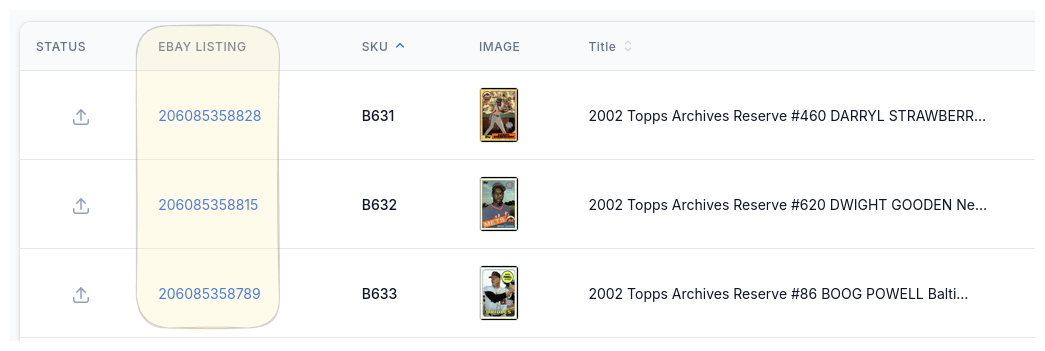
Every Card Linked Back
Once listed, every card gets its eBay listing ID linked right back in your batch. Click it and you see exactly what your buyers see — the actual live listing on eBay.
No guessing whether your title looks right or your images uploaded correctly. You’re looking at the same thing a collector in Nebraska is looking at when they search for your card.
Can’t List the Same Batch Twice
Because it’s 1am and you’ve been listing for three hours and you can’t remember if you already hit the button — CardLuma won’t let you list the same batch twice. You’ll get a big red warning telling you exactly when you already listed it.
We know how this goes. You’re tired, you’re on autopilot, and double-listing a batch means duplicate listings, eBay policy headaches, and angry buyers. Consider it a seatbelt you didn’t know you needed until you needed it.

Complete listings, without the cleanup.
Turn scans into eBay-ready listings with the specifics buyers filter on, then reuse clean card data in Whatnot workflows.