
Description Template Automation
A $2 common and a $200 graded rookie shouldn’t carry the same blurb. Set the rules once and CardLuma picks the right description template for every card — by price, graded status, and quantity.
One Default Doesn’t Fit Every Card
You don’t describe a graded slab the way you describe a raw common. High-dollar cards get the long pitch — condition notes, return assurance, the full sell. Bulk gets the short version. Multi-quantity lots get language that makes sense for a stack, not a single.
Doing that by hand means remembering to switch the template on every card, every batch. Miss it once and a $200 card ships with your throwaway boilerplate. This one came straight from a seller who asked for it — so we built it.
Now CardLuma chooses for you. Turn on “Set the description template automatically based on card details” and your rules decide which template each card gets, before you ever open it.
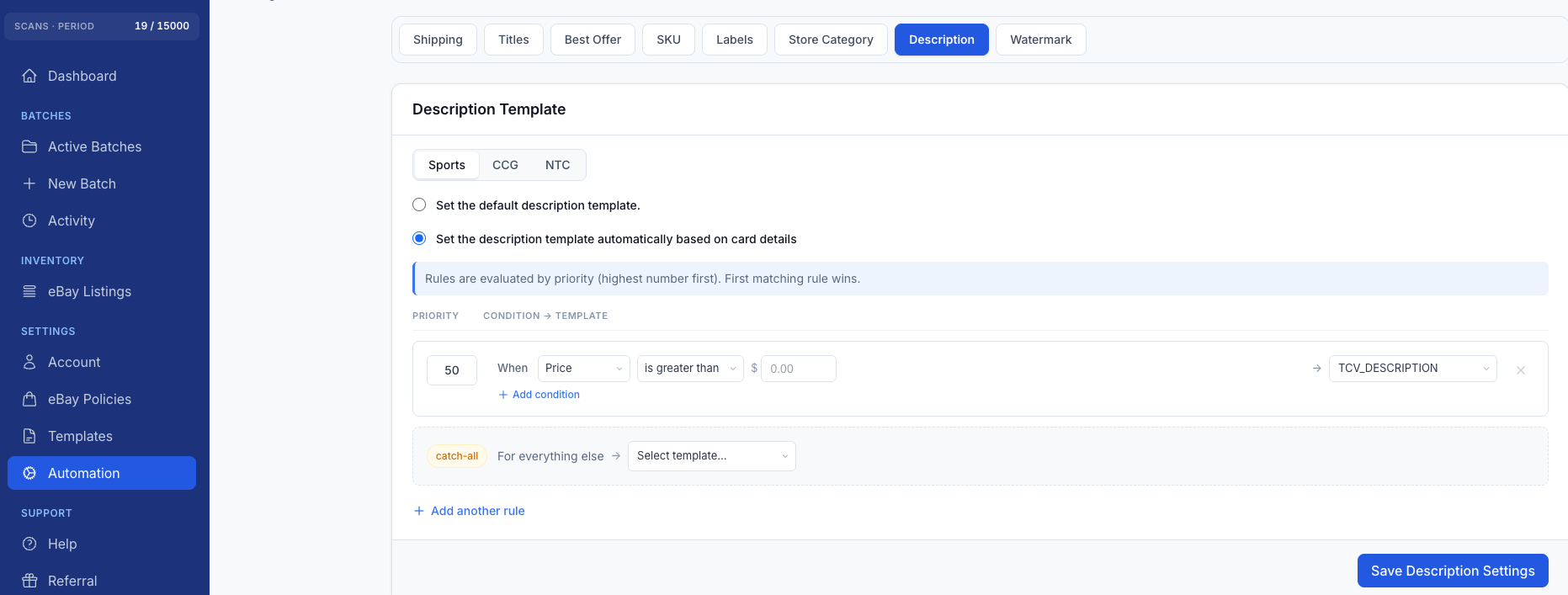
Click image to view full size
Rules in Priority Order, First Match Wins
It works the same way as the rest of CardLuma’s automation. Each rule has a priority — highest number first — and the first rule a card matches is the template it gets. Build a condition on Price, Graded status, or Quantity, stack conditions together when you need to, and point each rule at one of your saved description templates.
Set a high-priority rule that sends anything over $50 to your premium template. Send graded cards to a slab-specific template. Drop a catch-all at the bottom so everything else gets your standard description — no card ever falls through without one.
Sports, CCG, and non-sports cards each get their own rule set, so your Pokémon templates never step on your vintage baseball ones. The right ruleset fires automatically based on the card type.
Built on Templates You Already Use
Automation picks from the same custom description templates you build for your store — nothing new to learn, just rules deciding which one lands where. Any card can still override the batch default when you want to, and you can bulk-update the description template across a whole batch in one action when you’d rather set it by hand.
Complete listings, without the cleanup.
Turn scans into eBay-ready listings with the specifics buyers filter on, then reuse clean card data in Whatnot workflows.