
Keyboard Shortcuts for Speed
Every click is a context switch. Condition assignment, title customization — the repetitive parts of card processing — should happen with a keystroke, not a mouse hunt through menus. CardLuma maps them all to keyboard shortcuts.
Set Condition Without Lifting Your Hands
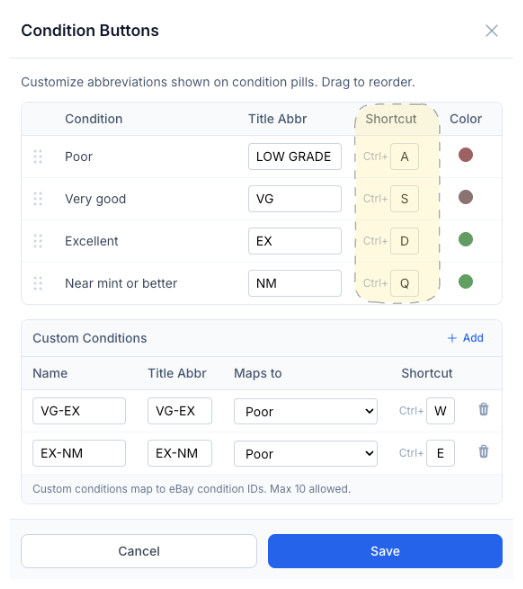
Each condition grade maps to a keyboard shortcut. Ctrl+A for Poor, Ctrl+S for Very good, Ctrl+D for Excellent, Ctrl+Q for Near mint or better. One keystroke sets the condition and you move on.
No dropdown menus, no scrolling through options. You’re grading cards — your eyes should be on the card, not hunting for the right button.
Custom Conditions, Custom Shortcuts
Created custom conditions like VG-EX or EX-NM? They get their own shortcuts too. Ctrl+W, Ctrl+E — whatever keys make sense for your workflow. Up to 10 custom conditions, each with its own shortcut, title abbreviation, eBay mapping, and color pill.
You define the grading scale you actually use, and CardLuma gives you a fast way to apply it.
Inject Title Text in One Keystroke
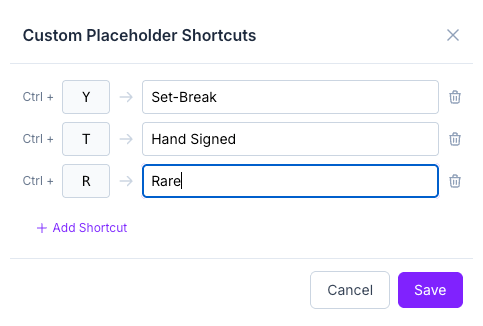
Common title additions — “Set-Break,” “Hand Signed,” “Rare” — bound to Ctrl+Y, Ctrl+T, Ctrl+R. Hit the shortcut and the text drops into the title. No selecting, no typing, no interrupting your flow.
Add as many placeholder shortcuts as you need. Each one maps a key combination to a text string that gets inserted into the listing title on demand.
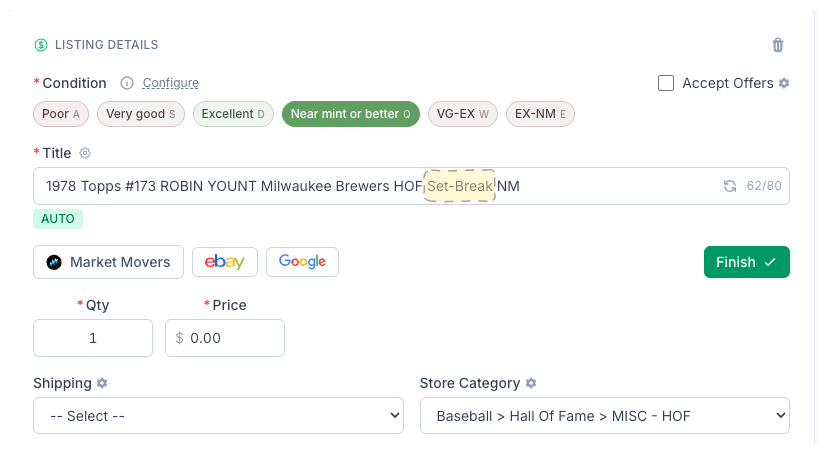
Condition already set, title already built, “Set-Break” already inserted — all without leaving the keyboard. The card is ready to list.
Complete listings, without the cleanup.
Turn scans into eBay-ready listings with the specifics buyers filter on, then reuse clean card data in Whatnot workflows.