
Custom Batch Names
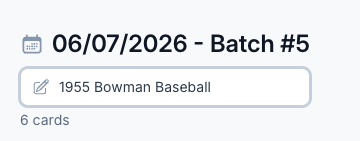
“Batch #5” tells you nothing. Name the batch what it actually is — “1955 Bowman Baseball” — and find it in one glance.
A Batch Should Tell You What’s In It
Every batch used to be just a number and a date. “Batch #5, 06/07/2026.” Fine when you have two open. Useless when you have a stack of them and need to find the one with the Bowman vintage.
Now you give the batch a real name. Click into the name field, type “1955 Bowman Baseball,” and that’s what it’s called from then on. The batch number and date stay where they are — the name just sits on top so you know what you’re looking at.
Edit it inline anytime. Renamed a batch because the contents changed, or you finally settled on a naming scheme? Click, type, done. No menus, no separate edit screen.
Click image to view full size
Forty Batches Deep, Names Are the Difference
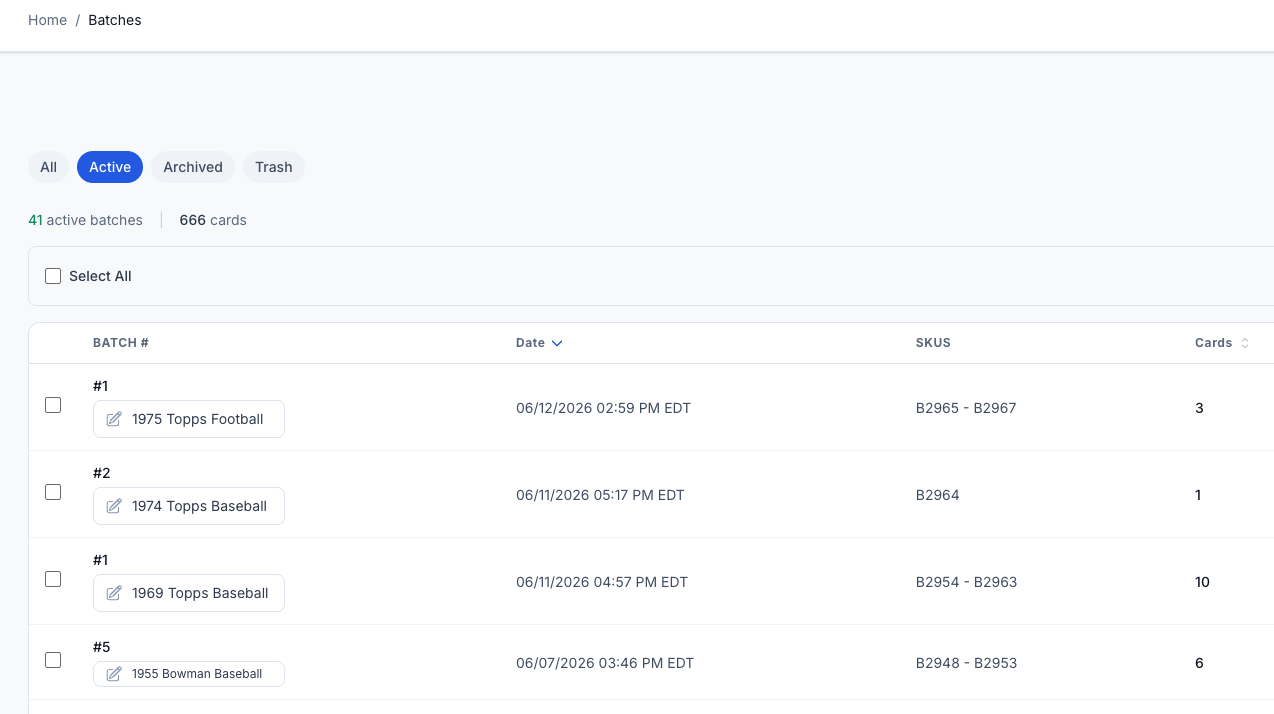
One or two batches, numbers are fine. Forty-plus active batches deep, the numbers blur together and every row looks the same. You end up opening batches one at a time just to remember which is which.
Names fix that. “1975 Topps Football,” “1974 Topps Baseball,” “1969 Topps Baseball” — the list turns into something you can actually scan. You spot the right batch by sight instead of by trial and error, with the batch number, date, SKU range, and card count still right there next to it.
Names pair well with Batch Tags — name the batch for what it is, tag it for how you work it, and your batches list stays organized no matter how deep it gets.
Click image to view full size
Complete listings, without the cleanup.
Turn scans into eBay-ready listings with the specifics buyers filter on, then reuse clean card data in Whatnot workflows.