
Bulk Front/Back Image Swap
Scanned an entire batch backwards? Fix the whole batch in one action instead of correcting every card individually. Customer requested — because it happens to everyone eventually.
It Happens on the Fourth Box of the Night
You load the scanner, run 200 cards, and only when you open the batch do you see it: every front is a back and every back is a front. The scan is fine. The order is wrong.
Fixing that one card at a time is 200 clicks of pure penance. CardLuma has always let you swap front and back on a single card in the card edit screen — that’s the right tool when one card came through reversed. It’s the wrong tool when the whole batch did.
One Action, Whole Batch
Select the cards, hit the bulk swap, and every front and back trades places at once. Re-scanning the box isn’t the answer — the images are already good, they’re just in the wrong slots.
It lives on the pairing screen, right next to Identify Cards — one button, Swap all front/back. Catch it there and every card is correct before identification even runs. Individual cards still have their own swap arrows for the one-off that came through backwards on its own.
The swap runs before your listings publish, so the combined front + back image composites in the right order and the front of the card is what buyers see in the thumbnail. Which is the entire point of a thumbnail.
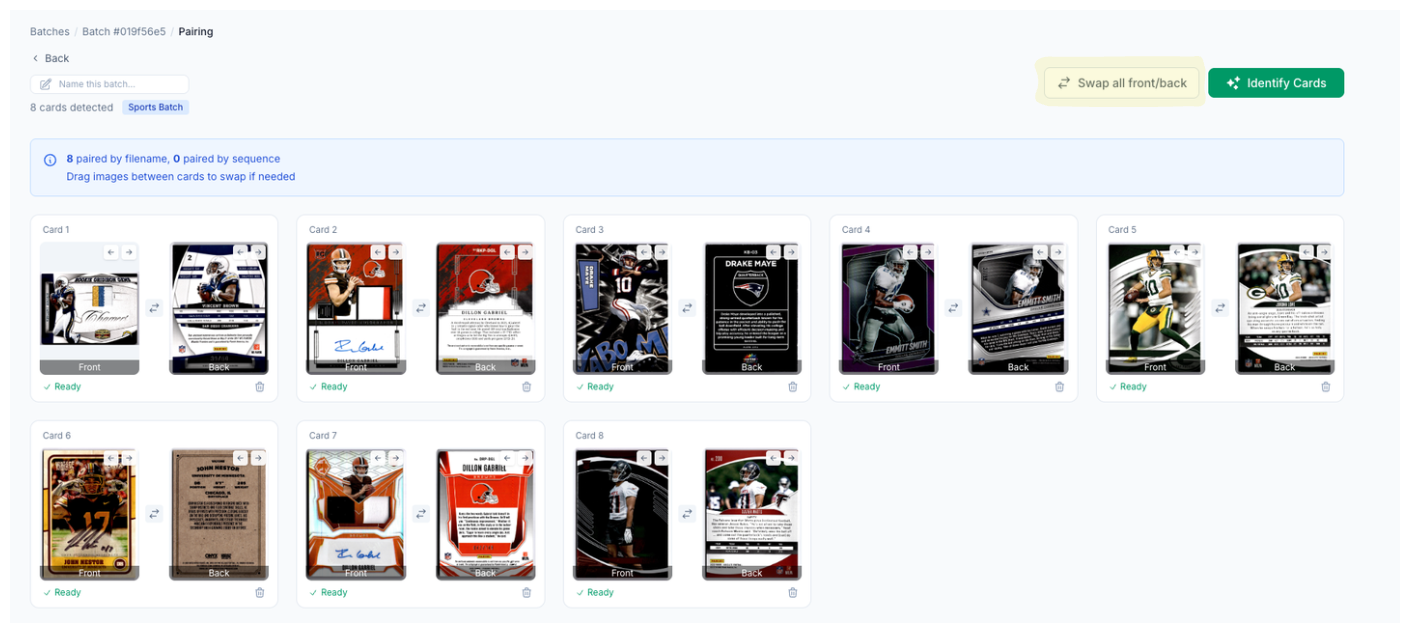
Click image to view full size
Complete listings, without the cleanup.
Turn scans into eBay-ready listings with the specifics buyers filter on, then reuse clean card data in Whatnot workflows.